
 Job Search
June 10, 2026
Tips From Recruiters: 9 Things That Actually Get You Hired
Get recruiter tips straight from the source. From tailoring your resume to following up after interviews, here’s what hiring managers actually want to see.


Studies show that as many as 98% of Fortune 500 companies use ATS systems. Moreover, more than 88% of employers believe that qualified candidates are filtered out because their resume isn't ATS-friendly.
This leaves no doubt about their significance in today's job search market.
So, let's learn how to optimize resumes for ATS and make sure your application passes the scan with a high score to land on the recruiters' desk and get you the next interview.
Key takeaways:
An Applicant tracking system (ATS) is a software used by employers to scan and organize job applications. These systems parse resumes to extract relevant information such as work experience, skills, and education. Then, the software filters candidates based on how well they meet the job requirements.
How much the ATS can do depends on how advanced a specific system is. Some software can categorize applicants and even reject them, whereas others only act as filters for the applications. The tricky part is that you never know how sophisticated the system used by the company you're applying to is.
So, how does ATS work?
After submission, ATS first parses the document by extracting key information like your work history, education, skills, etc. Then, the system analyzes the data by comparing it against the job description, including the keywords and required qualifications listed.
Based on this analysis and depending on how sophisticated the ATS is, it may assign a score to your application, ranking you against other candidates. Finally, the software may also filter out applications that don't meet minimum requirements and mark the top-scoring applicants for recruiter review.
Did you know that.. More than 76% of employers use the skills filter as their primary filter in the ATS.
| Format | Good | Avoid |
|---|---|---|
| File type | Best choice is .docx (Microsoft Word) or plain .txt file but PDF files also work well | Pages.odt, images, scanned PDFs; ATS cannot parse these file types properly |
| Font | Arial, Calibri, Georgia, Times New Roman, Verdana. Font size: 10-12 for body text and 14-16 for your name | Decorative fonts, script fonts, stylized fonts |
| Headings | Standard headings like "Work Experience" and "Skills" | Creative headings like "My Journey" |
| Dates | Standard and consistent throughout the resume, for example: 01/2020 - 03/2023, placed next to the job title | Confusing abbreviations or unusual formats, like Winter 2020 |
| Elements | Simple bullets, bold text, clear spacing | Tables, text boxes, graphics, logos, special characters |
| Contact information | Full name, phone number, email, and LinkedIn URL at the top in a simple format | Contact info in headers or footers as ATS may not read it |
| Job titles and company names | Standard job titles and official company name | Internal company jargon |
ATS systems assign scores based on how well your resume matches the job description. The main parts of the process are keyword matching and contextual relevance.
The first part looks for matches as well as variations and synonyms. So, if a job posting requires "project management" and "scrum", your resume should say "Managed five projects using agile methodology and scrum framework, delivering solutions 20% ahead of schedule."
Contextual relevance analyzes the context to understand if you actually have the required experience rather than simply input the keywords into your CV.
For example, if the job listing says "5+ years of marketing experience", your work history should show marketing roles spanning from 2018 to 2024, with progressive responsibilities. A weak context relevance would be listing "marketing" as a skill with little experience in the role.
Remember to use the right keyword density balance. This means instead of overstuffing keywords, use them naturally while also using variations.
If you're in a hurry, here are immediate action points to take away with you:
Understanding what makes a resume ATS-compliant is essential for your job search strategy. Different industries have different ATS configurations. For example, tech companies might prioritize specific programming languages or certifications, whereas finance firms often emphasize regulatory knowledge and analytical tools. Regardless of your field, here are the steps that will help you create an ATS-optimized resume that passes the initial screening:
This is the most critical step in ATS resume optimization, yet it's often overlooked. Instead of immediately rewriting your old CV, start by thoroughly analyzing the job description itself. This is your roadmap to what the ATS will be looking for.
The biggest mistake I see candidates make is treating their resume as a static document. Modern ATS isn't just scanning for random keywords. Instead, it's looking for contextual matches between the job requirements and your experience.
Christy Morgan – Career Coach @ JobLeads
To start, copy 10 to 15 job descriptions into a document. Then, highlight repeated elements like specific skills, tools, certifications, etc. For example, if "project management" and "agile methodology" appear three or more times, you know these are priority areas. And don't forget to note the exact phrasing. Pay attention to how requirements are worded so you can match that in your resume later on.
Read more: Go through the most common resume mistakes and learn how to fix each one of them.
It's beneficial for you to make it easy for the ATS to parse your CV. Complex formatting confuses the system which can cause it to misread or miss important information altogether.
The best resume format for ATS is clean and simple in structure. Think of it as making your resume machine readable first, visually appealing second when it comes to priority.
Some best practices include:
Importantly, choose recognizable headings. ATS systems use headings to understand the context of information on your resume. This means that when the software encounters a heading like "Work Experience," it knows the content below should be categorized as employment history. Whereas creative headings confuse this categorization process.
Modern ATS systems, especially those with AI-powered capabilities, evaluate keyword relevance alongside placement and context. This new software is designed to identify whether keywords appear in meaningful ways or are just randomly inserted. Which puts to rest the outdated approach of keyword stuffing.
Some of the best practices for this step include:
A good example when applying for a marketing position would be:
Marketing professional with 5+ years of experience developing integrated digital campaigns, creating content strategies, managing email automations, and analyzing campaign performance using Google Analytics.
Generic duty descriptions don't help your resume stand out, and they don't give the ATS the context it needs to rank you highly. Remember that modern systems look for evidence of impact, not just task lists. So, don't shoot yourself in the leg. Instead, frame your experience as accomplishments with measurable result.
Here's a formula for effective resume bullet points:
| Action verb + Task + Tools/Skills used + Measurable result |
|---|
For example, instead of "Responsible for social media management", you can say "Increased social media engagement by 156% across all platforms using Hootsuite and data-driven content optimization strategies."
The example includes specific tools, methodologies and skills, which you should take from the job description and your own experience. It also provides concrete evidence of impact through metrics.
Read more: Check out the best free resume builders that will help you create a winning application.
The Skills section is the first place an ATS looks at when matching your resume to a job description. Let's ensure it's organized well for best results.
Start by listing your hard skills. These are the concrete abilities and software proficiencies that are easiest for an ATS to identify and match. Make sure to mirror the wording of the skills listed in the job posting as much as possible.
A few examples of hard skills include:
If you have relevant professional certifications, list them next. These could include:
Last, but not least, list your most relevant soft skills. While soft skills like communication and problem-solving are important, they're hard for an ATS to verify. This means that they carry less weight in the algorithmic ranking. So, ideally, you should include the ones mentioned in the job description, but don't dedicate more than 20% of the Skills section to them.
Once again, ATS systems match resumes to roles using job title similarities. So, if your previous title was "Customer Happiness Guru" but you're applying for a "Customer Service Manager" position, the system may not recognize the connection.
So, to increase your chances of passing the ATS parsing, you should replace the creative internal titles with market-recognized equivalents. For example, instead of a "Marketing Ninja", put a "Marketing Specialist" on the resume.
If you want to have your internal title, it's best practice to include both the standard and the unique title. This would look like this: Marketing Manager (Digital Growth Lead).
Another aspect when it comes to job titles is hierarchy. If you had progressive roles at the same company, make sure the titles reflect that progression. For example, you can put Junior Data Analyst → Data Analyst → Senior Data Analyst → Lead Data Analyst.
Consistency helps ATS systems parse your employment history correctly. So, choose one date format and stick to it. What this means is that you should write either 01/2020 - 12/2023 or Jan. 2020 - Dec. 2023. Avoid mixing the formats like, January 2020 - 12/2023, as this confuses ATS parsers.
For the employer information, you should include complete company names as it appears on your employment document. For example, "Google LLC", instead of just "Google."
Going back to the hierarchy of your roles — if you held multiple positions at the same organization, format them clearly. For example:
Company name, Location | MM/YYYY - MM/YYYY
Senior Marketing Manager | MM/YYYY - Present [Bullet points for this role]
Marketing Manager | MM/YYYY - Present [Bullet points for this role]
Marketing Coordinator | MM/YYYY - Present [Bullet points for this role]
Tip: If you have a career gap, you should include an explanation for this period in your resume instead of leaving an unexplained resume gap. This could look like "Career Break | Jan. 2022 - Aug. 2022" or "Volunteer Work | March 2023 - July 2024."
Even a perfectly optimized resume can fail if you submit it in the wrong format. The safest option is .docx (Microsoft Word format) as most ATS platforms are optimized to parse Word documents accurately. This format preserves your formatting while remaining machine-readable.
PDF is acceptable but there are critical considerations to it. The PDF must be text-based, not a scanned image. It also should be created directly from a word processor, not converted from design software. Once your file is ready, utilizing a pdf to link converter can also make it simple to share your resume via URL if an employer requests a digital link instead of an attachment.
You should keep in mind that some older ATS versions still struggle with PDF formatting so it's safest to see if the job posting mentions this format or advises you to use a Word document.
When it comes to naming your file, you should use a professional and descriptive filename that includes your name. For example, John_Smith_Resume.docx.
Ensure that you test your file by opening it on a different computer before submitting the application. This will help you see if the formatting remains intact and everything looks right no matter if you use a Mac or a PC.
Every job application requires tailoring your resume to match that specific role and company. So —
Even when you have a well-optimized CV, you should always check the following before submitting your application:
You don't need to write your resume entire from scratch for every application, but you should customize the key elements like the professional summary, skills section, and job titles. It is also a good option to use AI tools for writing or rewording your resume content. But, it's important to fully understand how such tools work before using them.
Read more: Check out the list of best resume builders you can use to create your application and ensure it’s ATS friendly.
Understanding where people typically go wrong can help you avoid these pitfalls and ensure your resume passes ATS scanning successfully.
Be careful with:
The rule of thumb is that you want to make it easy for the ATS to scan your resume, so you need to change anything that complicates this process. The easier it is for the ATS to scan and grade your resume, the more likely your resume is to receive a higher score.
What does a good ATS score mean in the first place?
Many ATS checkers provide a match score, typically expressed as a percentage. A score of 80%, for example, generally indicates strong alignment with job requirements. As long as you're above that mark, it's a good ATS score.
And don't get too fixated on achieving a perfect 100% as different ATS platforms use different algorithms so you can't be sure which one the company you're applying to uses.
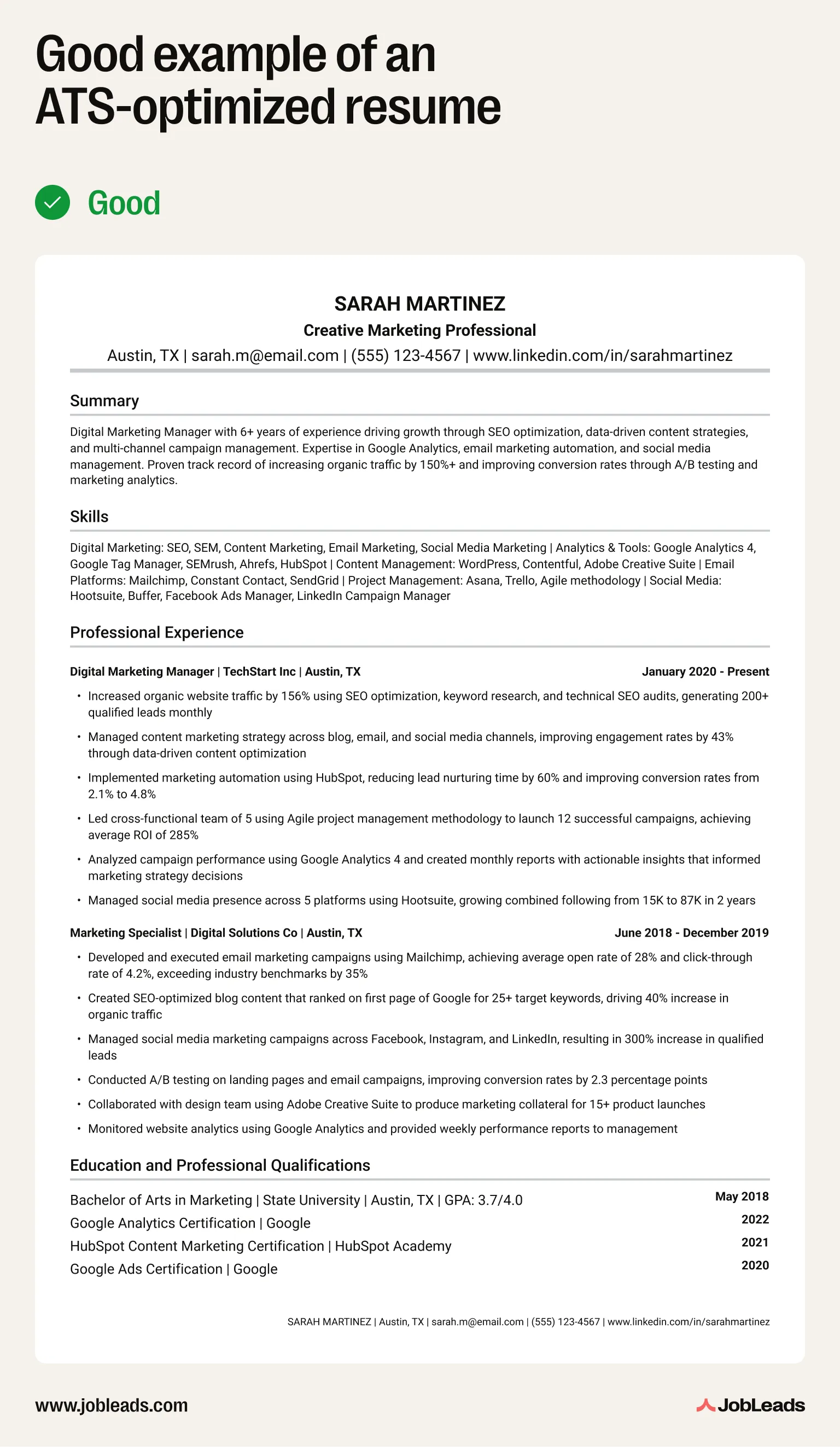
Here's an example of a poorly optimized resume and a highly-optimized resume for ATS:
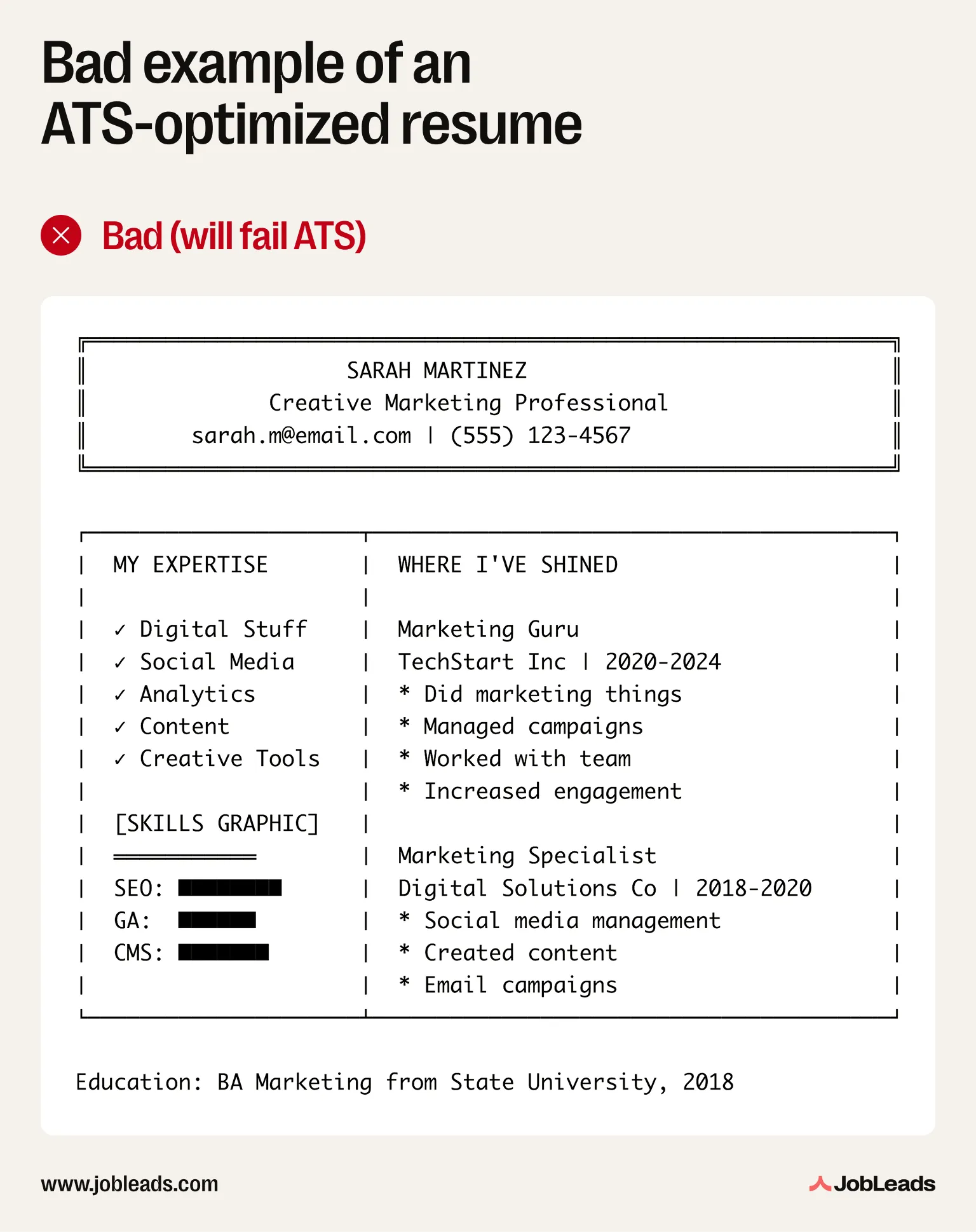
The first resume doesn't work because of:
This resume might look interesting to a human reviewer but it will never reach one because the ATS can't properly parse it. The system will miss most skills and won't understand the employment history structure which will lead to a poor score of the CV.
The second resume works because:
This ATS-friendly resume will parse correctly through any of the systems The machine will accurately extract all information needed and rank the CV highly because of the frequently appearing keywords alongside context.
While this guide has focused extensively on how to optimize resumes for ATS and ensure your application passes the screening, it's crucial to remember that it's humans who make the final hiring decision.
The application tracking system is a gatekeeper. Your ATS compliant resume needs to pass the initial algorithmic screening, but also impress the recruiter who reviews it afterwards.
So, the most effective ATS resume strategy recognizes that just passing the ATS is necessary but not sufficient for landing the job. Your resume needs to:
All three elements matter in order for your resume to land you an interview invitation.
If you're unsure whether your resume is truly ATS-optimized, or if you want professional guidance on making your resume stand out, JobLeads offers a free resume review service.
In this review, our experts will analyze how well your resume passes ATS screening and evaluate alignment with your target roles. At the end, you'll receive a personalized guide on how to make your CV appeal to both humans and ATS systems.

Content & Insight Writer
Beata creates content that puts job seekers first. From practical blog advice to first-hand research studies, her writing is designed to give people the clarity and confidence to find the role they deserve.
Job SearchGet recruiter tips straight from the source. From tailoring your resume to following up after interviews, here’s what hiring managers actually want to see.
 Job Market Trends
Understand the state of remote work in the US in 2026 with JobLeads data on hiring demand, industry trends, regional patterns, and worker preferences.
 Job Interviews
Learn what an elevator pitch is, how to create one, and how it can land you great jobs. Find tips, examples, and templates for crafting your perfect pitch!