
 Resume
August 05, 2024
How to Write a Resume Summary with Little or No Work Experience
Craft a standout resume summary with our expert tips for entry-level job seekers lacking experience. Land that job with confidence!


You can be perfectly qualified for a job and still never hear back. That's not because a recruiter said no, but because the software in front of them rejected you first.
A JobLeads survey found that over 81% of job seekers sent at least 11 applications into silence and almost a quarter crossed 100 without hearing back. Interestingly, many of those resumes likely never even reached a human. They were filtered out by an applicant tracking system (ATS)–according to Jobscan, nearly 98% of Fortune 500 companies use one.
In this guide, you'll get everything you need to make your ATS-friendly resume.
Get a free resume review and see exactly how an ATS reads your resume.
First things first–
An ATS-friendly resume is a resume formatted in such a way that an applicant tracking system (ATS) can read and rank it correctly before a recruiter sees it. It uses a single-column layout, standard fonts, section headings, and keywords pulled directly from the job description.
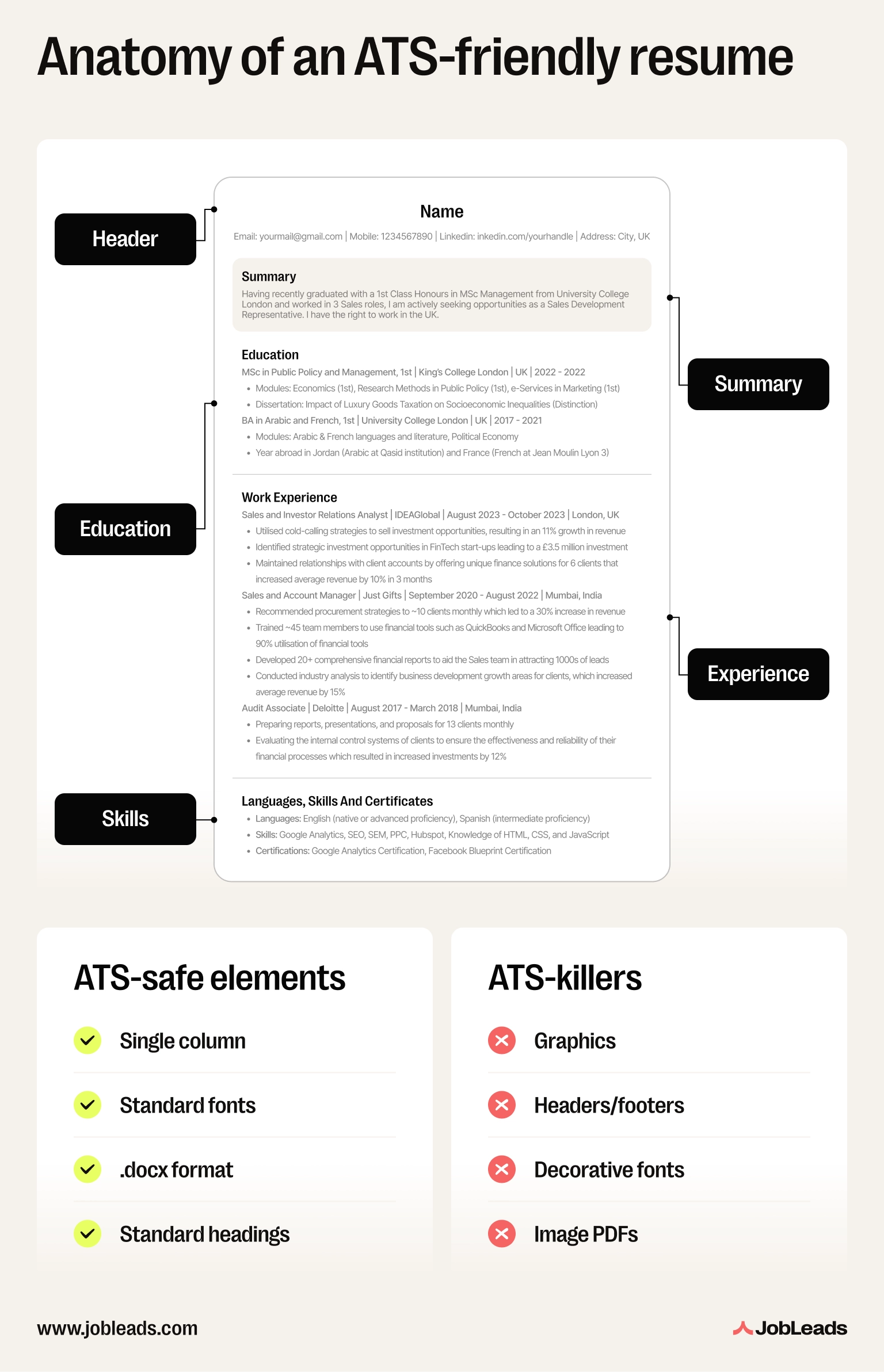
Companies like iCIMS (11% market share), Oracle (Taleo), and Workday lead the ATS market. According to Apps Run the World research, the top 10 providers account for 51% of all ATS spend. But they all do the same thing. They pull out your job titles, dates, skills, and keywords. Then they score how closely you match the role.
Interestingly, the people running these systems know they're imperfect. In Harvard Business School's study, more than 90% of executives admitted their ATS screens out qualified candidates. The usual culprits include things like a 6-month employment gap, a missing exact-match keyword, or a non-standard job title.
So, in simple words, what makes a resume ATS-friendly?
Here are the ATS friendly resume best practices:
Info
Jobscan found that over 76% of ATS start by filtering for skills. If your Skills section doesn't match the job description, you're invisible at the first cut.
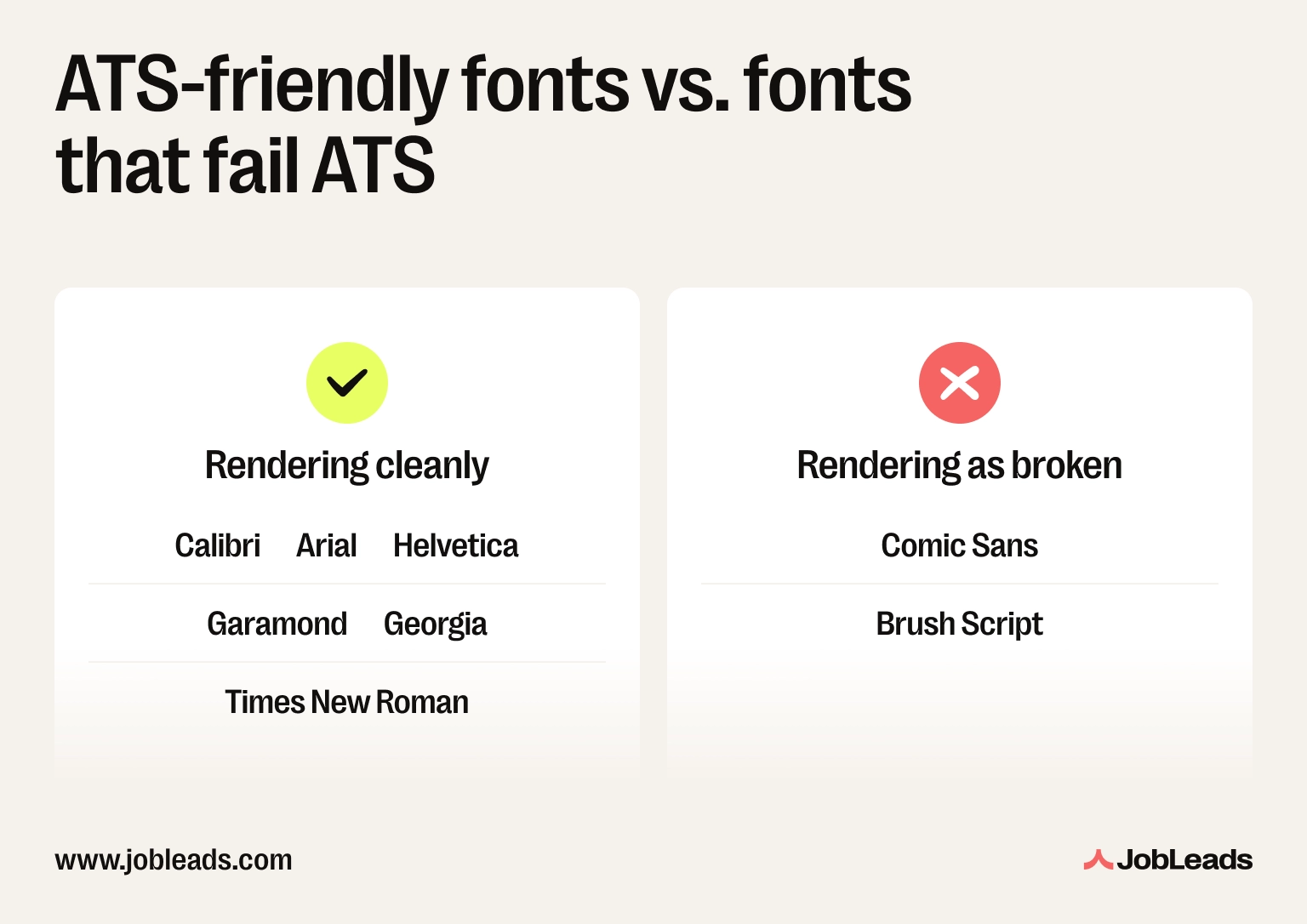
The best resume format for ATS parsing is a single-column, reverse-chronological resume saved as .docx, using a standard font (Arial, Calibri, Helvetica, Georgia, Garamond, or Times New Roman) at 10-12pt body and 14-16pt headings, with literal section headings ("Work Experience", "Education", "Skills") and no tables, text boxes, columns, headers/footers, or graphics.
Call it an ATS resume format, an ATS-friendly resume format, the right ATS format resume, or simply the right resume format for ATS–same answer. Most parsing failures come down to layout, not content. So, before you touch a single bullet, get the structure right.
File type is the first thing the ATS checks. Get it wrong and nothing else matters–your fonts, your keywords, your quantified bullets all stay invisible. So, here's a checklist for the format to use:
ATS parsers read top-to-bottom, left-to-right. A two-column layout almost always scrambles the work history. The parser flattens it back into a single stream and your roles end up in the wrong order.
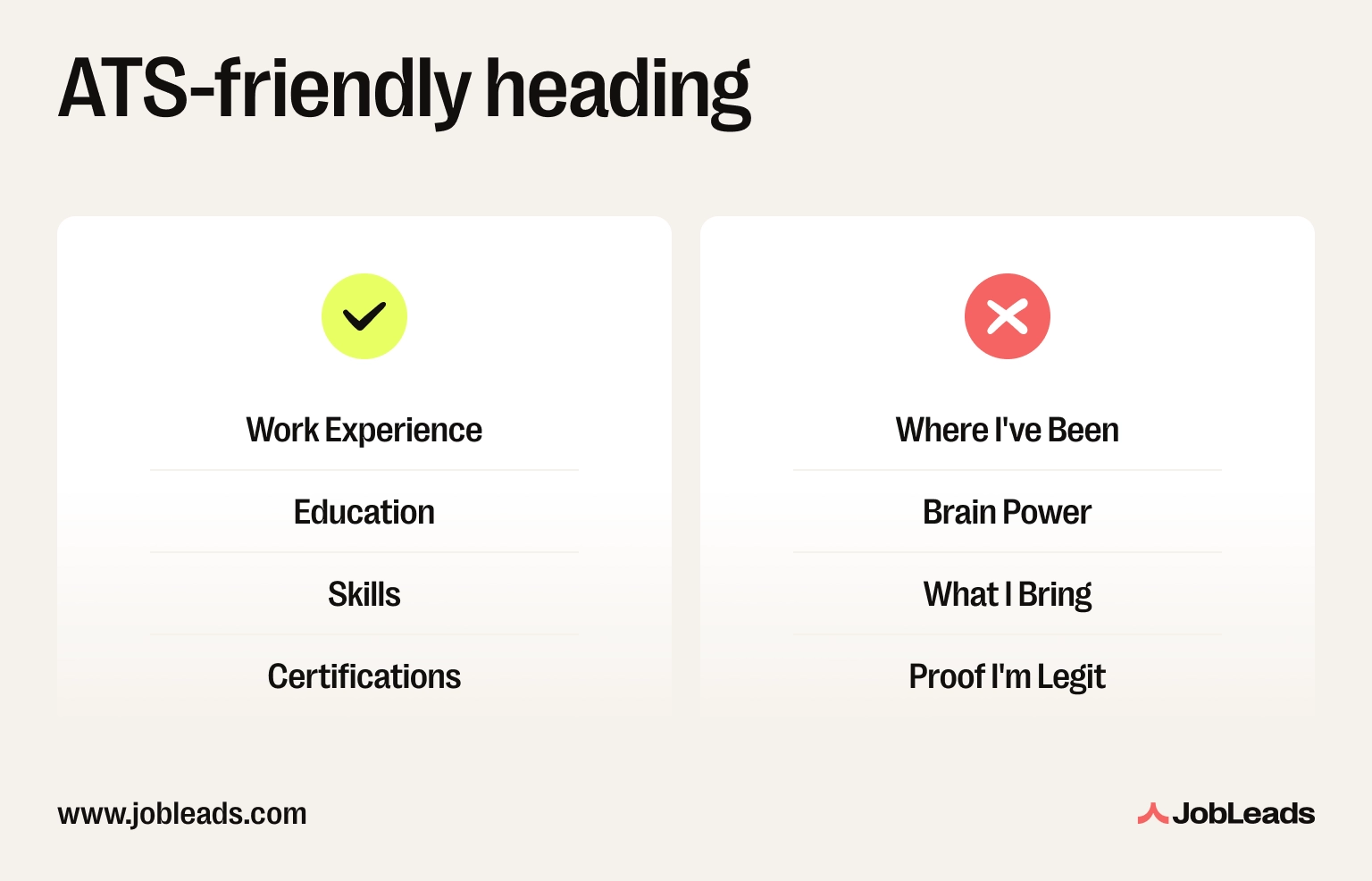
Use "Work Experience", "Education", "Skills", "Certifications", etc. Not something like "My Journey" or "Brain Power". Cute headings get skipped entirely by most parsers. Workday and Taleo are said to be especially strict.
Before you hit submit, your resume should pass every row:
| Element | ✅ Pass | ❌ Fail |
|---|---|---|
| File type | .docx or text-based .pdf | .pages, .rtf, image PDF, scan |
| Layout | Single column, top to bottom | Two-column, sidebars, columns |
| Headings | "Work Experience", "Education", "Skills" | "My Journey", "Brain Power", "What I Bring" |
| Fonts | Arial, Calibri, Helvetica, Georgia, Garamond, Times New Roman | Comic Sans, Brush Script, custom downloaded fonts |
| Graphics | None–text only | Photos, logos, icons, skills bar charts |
| Header/footer text | Contact info in the body | Name/contact inside header or footer region |
Tip
If your current resume is two-column, paste it into a plain text editor (Notepad on Windows, TextEdit on Mac) and read the output. If the order looks scrambled to you, the ATS will see it the same way.
Fonts are the easiest fix on this whole list. But get them wrong and the ATS can render your resume as gibberish. Stick to parser-safe system fonts at 10-12pt body and 14-16pt headings.
The ATS-friendly shortlist:
Fonts to avoid:
Tip
Stick to one font family throughout. Mixing two or three fonts adds parsing risk and looks busy.
Once typography is sorted, the next format question most candidates ask is "how long should a resume be." Short answer for page count is to aim for one page if you're under 10 years in, two pages if you're senior.
These five ATS friendly resume tips are the same best practices every well-built ATS optimized resume follows. They're also how to make a resume ATS friendly without rewriting it from scratch. Each tip below maps to a specific parser failure mode we see most often.
All ATS scan for predictable headings. Get creative and the parser walks straight past the section. Your skills, certifications, or work history might never get indexed.
So, use the literal names the ATS expects and don't combine sections ("Experience & Achievements") or invent new ones ("My Story"). Also, bold them or bump the font size, but keep them as text. Never images.
✅ Right: Work Experience / Education / Skills / Certifications
❌ Wrong: Where I've Been / Brain Power / What I Bring
Parser failure it fixes: Sections being skipped entirely.
Read more: For the full step-by-step optimization playbook, see our guide on how to optimize your resume for ATS.
Most ATS read top-to-bottom, left-to-right. Then they flatten the content into a single stream. A two-column layout makes the parser zigzag. Your roles end up in the wrong order and your job title sometimes gets attached to someone else's company name.
Use a single full-width column. List your most recent role first and put dates on the right in a consistent format (MM/YYYY or Month YYYY).
✅ Right: Job title, company, MM/YYYY on the same row with most recent role at the top.
❌ Wrong: Two columns, left sidebar with skills bar chart and headshot, right column with "My Journey" timeline. Parser flattens it and your roles end up in the wrong order.
Parser failure it fixes: Work history being scrambled when two columns are flattened.
Every job description is a keyword list in disguise, and your resume gets ranked partly on how many of those keywords appear. It also looks at where they appear.
Pull the 8-12 most-repeated nouns and skills from the job description. Then, place them naturally in your Skills section, Summary, and Work Experience bullets. Also, mix hard and soft skills so the ATS sees both technical depth and soft-skill range. Lastly, ensure that you match the exact phrasing. If the posting says "stakeholder management", don't write "managing stakeholders" as many ATS tools score for exact-phrase match before they score for synonyms.
Parser failure it fixes: Low keyword match score even when you have the right skills.
✅ Right: Skills: Stakeholder management, Agile project management, Salesforce, HubSpot, SQL
❌ Wrong: Worked with people across the business on various initiatives
Read more: Our guide to decoding job descriptions shows how to pull the right keywords from any posting.
ATS rank harder on specific, measurable content and so do recruiters once the resume reaches them. This means that each bullet should answer four questions, including What did you do? How much? By when? With what result?
Use numbers, percentages, currencies, and timeframes wherever you can.
✅ Right: "Led migration of 4,000+ customer accounts to Salesforce, cutting manual reporting time by 38% over 6 months."
❌ Wrong: "Helped with the Salesforce migration project."
Parser failure it fixes: Weak ranking on content scoring even when you pass formatting.
Info
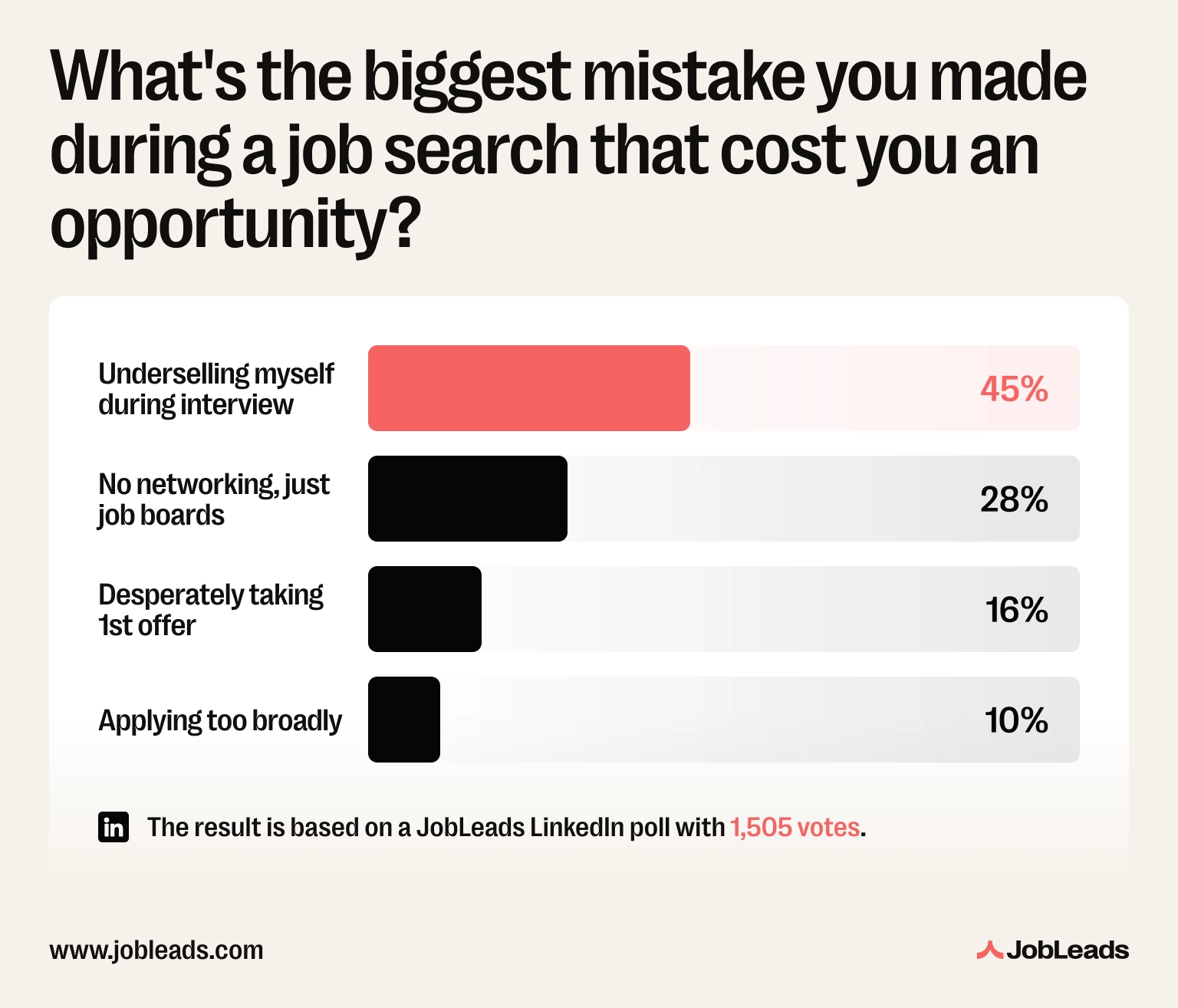
A JobLeads survey found that 45% of job seekers say their biggest job-search mistake was underselling themselves in interviews. The same pattern shows up on resumes when you use vague, non-quantified bullets–the recruiter and the ATS are left guessing how much you actually did.
Read more: Check out the deep-dive on how to quantify achievements on your resume even when you don't have the numbers on hand.
The wrong file type can kill your application before keywords or formatting even matter. That's because some file formats are simply not readable for ATS. So, if you want a safe choice, opt for .docx or text-based .pdf. But never use image-based files, scanned documents, or a Canva PDF export.
✅ Right: Exported as .docx straight from Word: text stays selectable when you open the file.
❌ Wrong: Exported as a PDF from Canva: looks like a PDF, but the whole resume is one big image and the ATS sees zero text.
Parser failure it fixes: The resume not being readable at all.
Try the JobLeads resume builder and create a resume that parses cleanly every time.
Theory only gets you so far. Here are three real-world ATS-friendly resume examples across different professions. Plus one bad example for direct comparison. These ATS resume examples show what works, what doesn't, and why a parser would treat them differently.
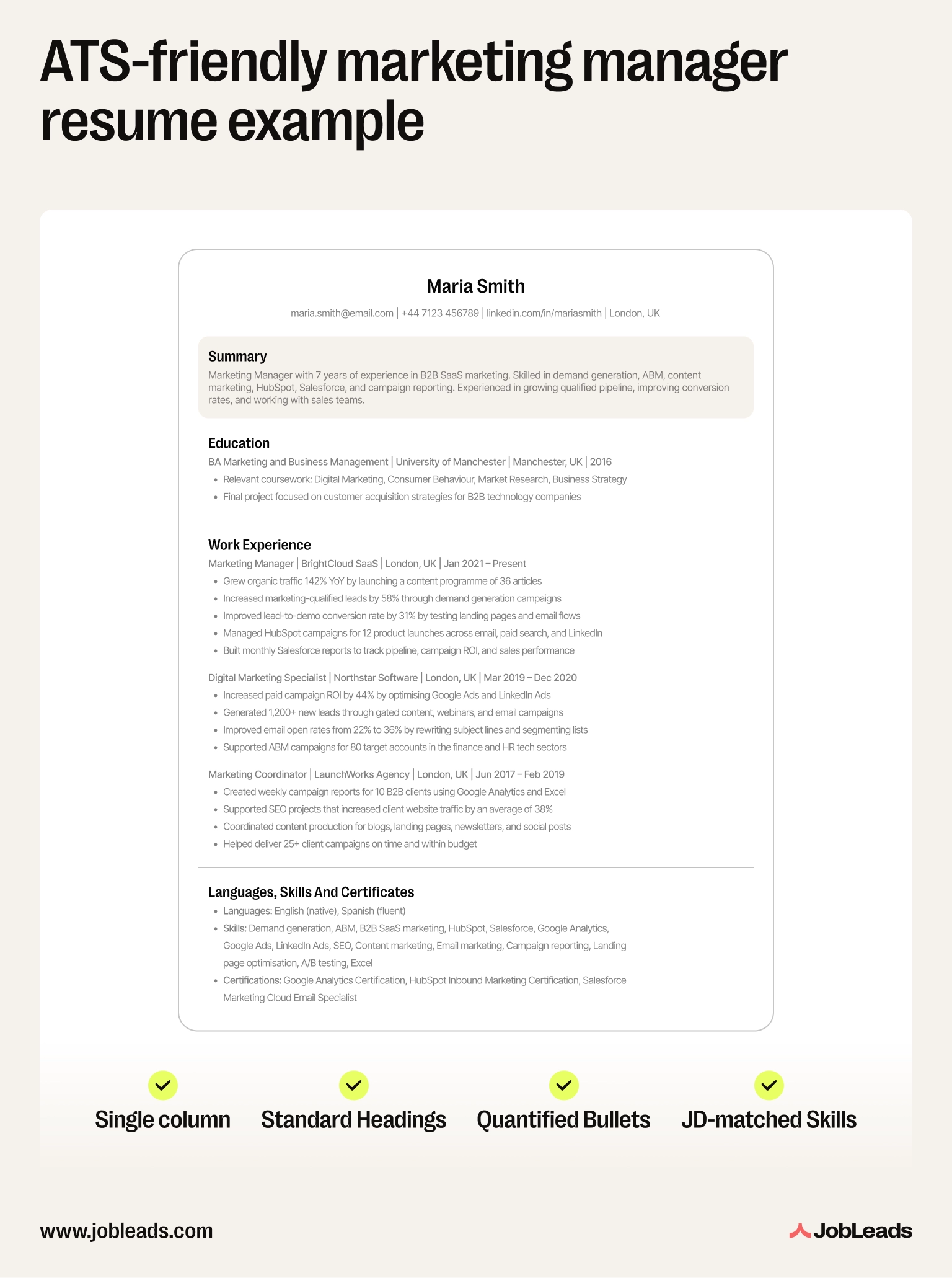
Maria, marketing manager with 7 years of experience, applying for a senior marketing role at a B2B SaaS company.
What this resume does well:
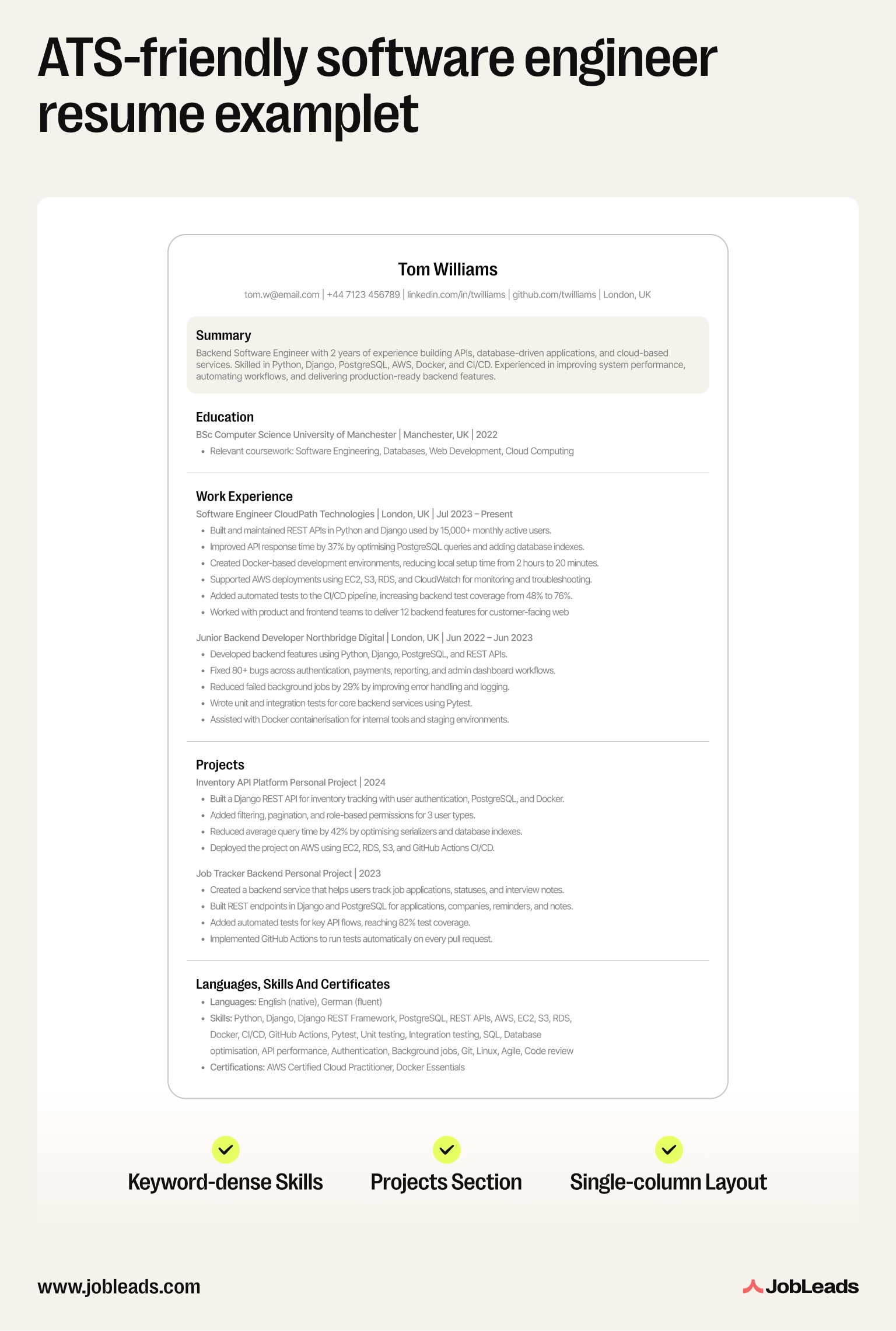
Tom, software engineer with 2 years of experience, applying for a mid-level backend engineer role.
What this resume does well:
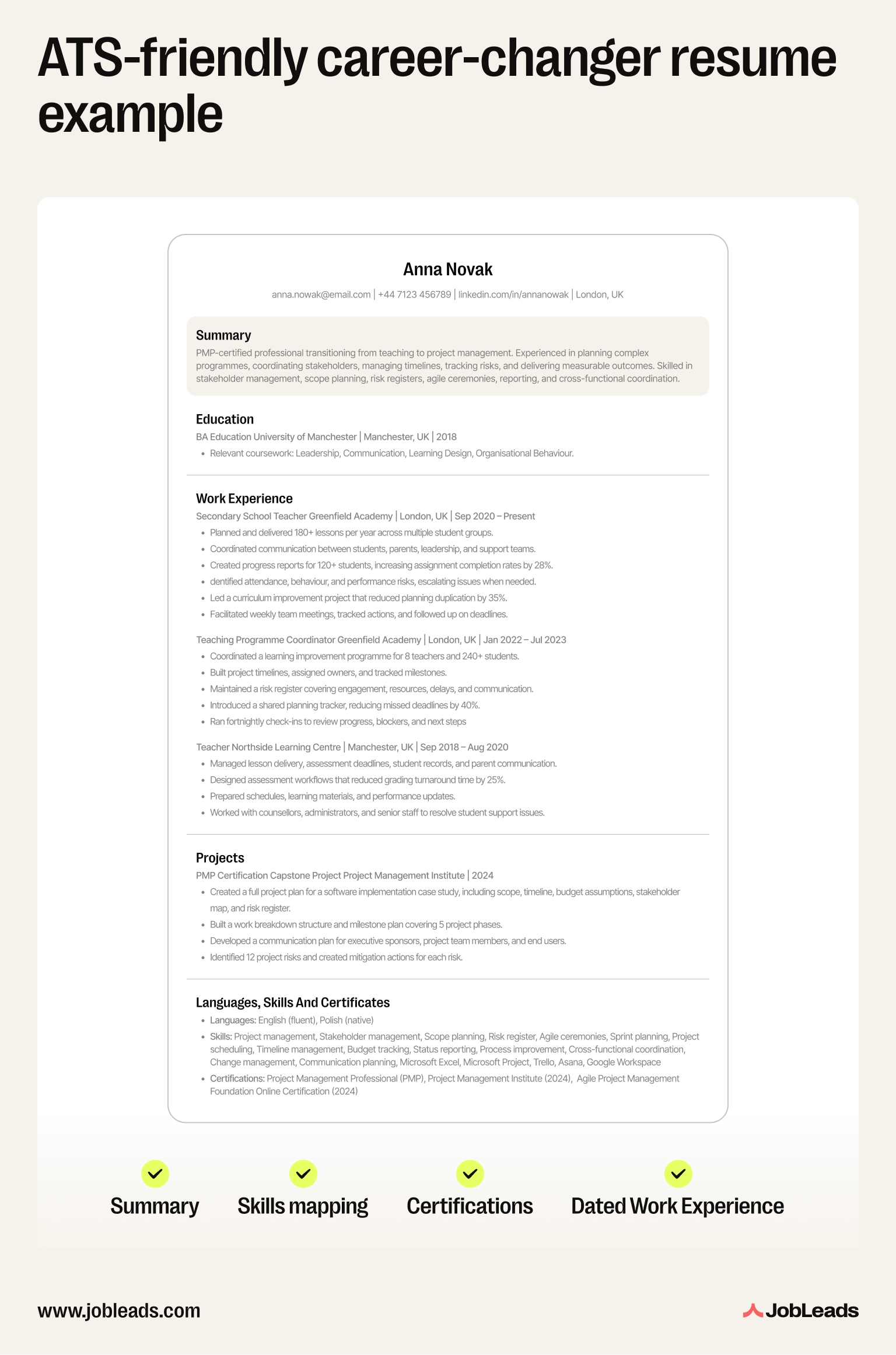
Anna, transitioning from teaching to project management after completing a PMP certification.
What this resume does well:
Info
Ladders' eye-tracking study found that recruiters spend an average of just 7.4 seconds scanning a resume on first review. And the ATS filter decides which resumes get those 7.4 seconds at all.
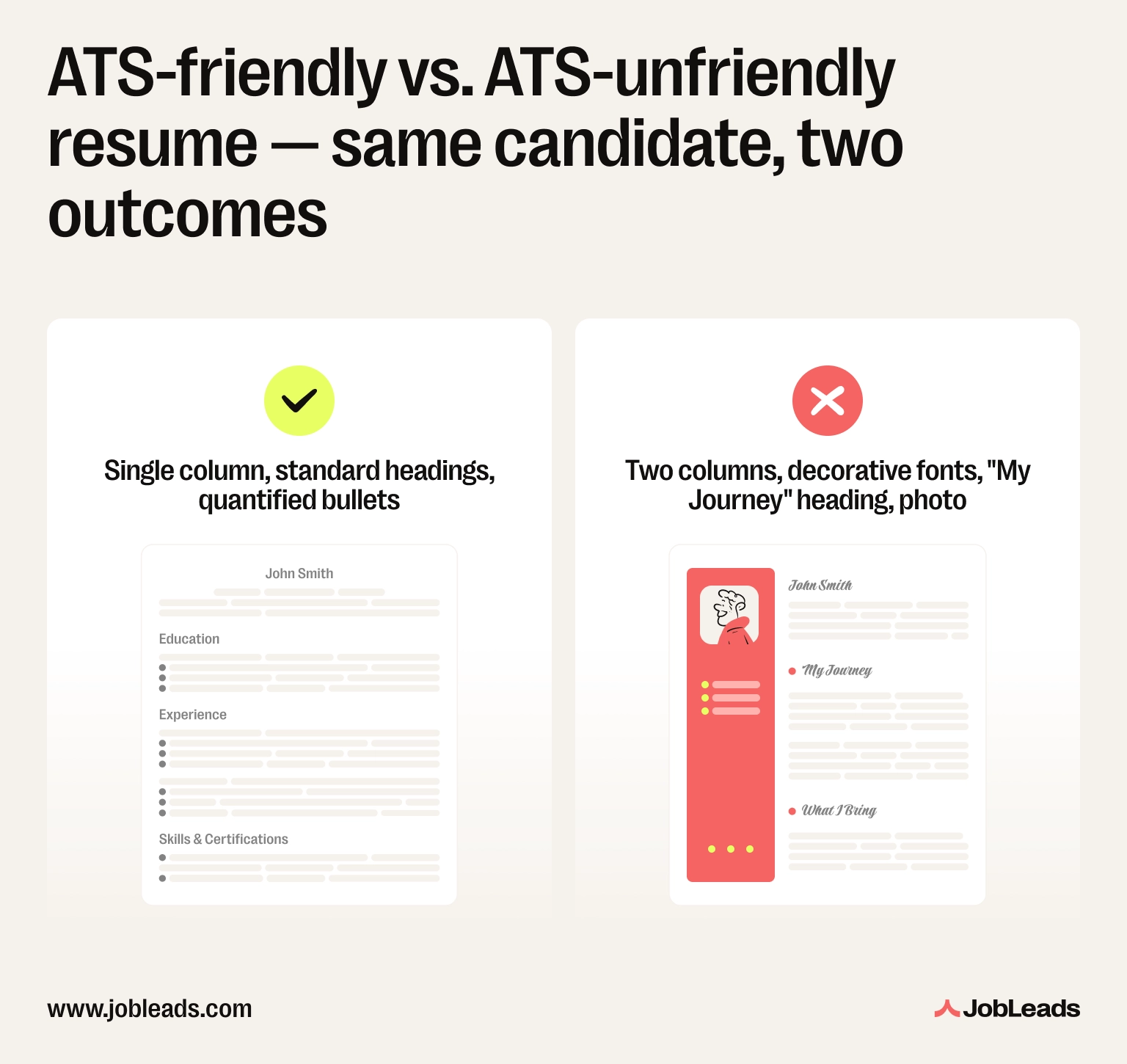
Same candidate, same experience, different resume–and an ATS rejection.
The failure points, line by line:
The kicker: this is exactly the kind of resume that ends up in our roundup of the reasons applications get rejected. Avoidable, every time.
Good ATS-friendly resume templates remove the formatting guesswork. They offer clean headings, single column, parser-safe fonts, and room for keywords. Here's the template we recommend, plus what to look for if you compare other ATS resume templates side by side.
Download the free JobLeads ATS-friendly resume template
Tip
If you compare other free ATS resume templates, open each in Word and check three things: is it single-column, are the headings standard, and is it actually a .docx (not a Canva or PDF export)? If any of those fail, swap it.
Wondering how to check if a resume is ATS-friendly the simple way? Run it through a resume ATS checker like Jobscan or the JobLeads resume review. The checker scores your resume against a specific job description and flags formatting issues, missing keywords, and parsing failures. Aim for an ATS resume score of 75% or higher before you apply.
Let's explain that a little more thoroughly–what's a good ATS resume score?
Info
Jobscan found that candidates whose resume job title matches the listed title get an interview rate nearly 11x higher than those who don't.
Here's the thing–
Passing the ATS isn't winning. It's just earning the right to be read by a human.
A JobLeads survey found that 51% of job seekers have no structured job search strategy, they just apply when they find job ads. That's the trap. Once your resume parses cleanly, the work shifts upstream. So, you should find the right roles, tailor keywords to each job description, and write a story that makes a recruiter want to call you back.
In 2026, there's a new layer on top of classic ATS–AI screening. SHRM's report found that 51% of organizations now use AI to support recruiting. And 44% of those use it to screen resumes.
The flip side comes from MIT Sloan research. It shows that when AI screening is built well, it can surface candidates the old keyword filter missed. The "exploration-based" algorithm lifted the interview-to-hire rate from 10% under human recruiters to 25%. It also surfaced over 3x as many Black and Hispanic candidates. The lesson for the job seeker is the same either way. The better the screener, the more it rewards specific, measurable content.
Bottom line–
ATS friendliness gets you through the door. Keyword fit, a sharp story, and a structured job search win the job.

Content & Insight Writer
Beata creates content that puts job seekers first. From practical blog advice to first-hand research studies, her writing is designed to give people the clarity and confidence to find the role they deserve.
ResumeCraft a standout resume summary with our expert tips for entry-level job seekers lacking experience. Land that job with confidence!
 Resume
How long should a resume be? Learn how many pages a resume should be for an entry-level position vs for someone with over 10 years of experience.
 Resume
JobLeads tested paid and free tools to pick the best resume builders available on the market. Here are the top resume generators for your job search and career level.