
 Resume
July 02, 2026
9 Best AI Resume Writing Tools in 2026 [Free & Paid]
Looking for an AI resume builder to help with your CV? Compare the best AI resume writing tools, paid and free, based on the main features and top use cases.


First of all–what is a resume?
A resume is a document with a purpose to win you an interview. A standard resume has six sections, fits on one page, and reads top to bottom in under a minute.
Think of your resume as a marketing document for one specific role, not a life story. The recruiter is comparing yours to hundreds of other applicants. They’re looking for fast reasons to say “yes” or “no.”
Bad news for job seekers–
Recruiters spend an average of just 7 seconds on your resume. That is less time than it takes to read this paragraph.
So, here’s how to write a successful resume from scratch.
Before we move on, let’s look at the difference between resume and CV.
In the US, a resume is a 1- to 2-page summary tailored to a specific job. In the UK and most of Europe, the word “CV” often means the same thing. A full academic CV is something different. It is multi-page, lists publications and grants, and matters most in academia or healthcare.
Did you know that…
The word “resume” comes from the French résumé, which means “summary.” It’s meant to be short by design. A recruiter scanning hundreds of applications has no time for more.
Writing a resume starts before you open a template. Skip the prep work, and you'll spend an hour creating a resume that says nothing the job ad asked for.
Preparation is what separates a generic resume from a tailored one. It’s always the right way to start a resume, whether you are building one from scratch or refreshing an old one.
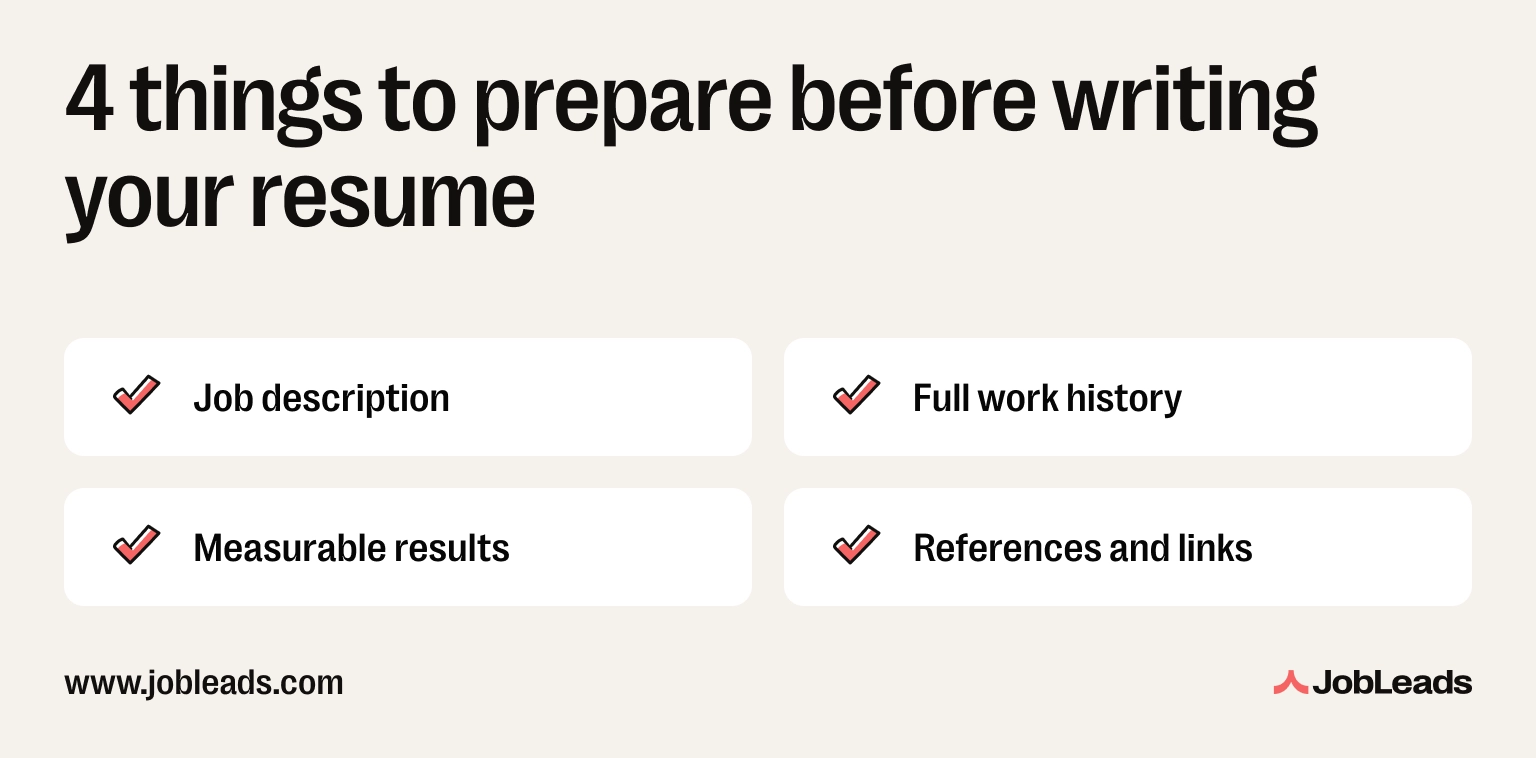
Read the job description twice. The first time, just read it like a candidate: do you actually want this job, and does it match your level? The second time, read it like a strategist. Highlight every required skill, tool, certification, and keyword. Also, note the order they appear in. The first three bullets in the “Requirements” section are usually the deal-breakers. Those are often the ones the recruiter is screening for first.
On top of that, pay attention to the language. If the ad uses “Google Analytics,” don’t write “GA” on your resume, if it says “stakeholder management,” don’t write “client communication,” etc. You get the point.
The ATS is looking for an exact match, and so is the human. Mirroring the job ad is the single fastest way to make your resume feel relevant in 7 seconds.
Pro-tip
Paste the job description into a blank doc and bold every relevant keyword. You will end up with a target list of 8 to 12 terms to weave into your resume.
List every role you have held, in reverse chronological order. Include job title, company, location, dates, and 3 to 5 key responsibilities. Do this even for roles you don’t plan to put on the final resume. The point is to have a full picture before you start cutting.
Why bother with the ones you won’t use? Two reasons. First, you won’t have to dig through old emails next time you apply for something different. Second, an old role you wrote off as irrelevant might have a transferable bullet you forgot about–a project you led, a system you built, a number you hit.
This is your “master resume.” Write everything down once. Then duplicate it and trim it for every application. It saves hours over the next weeks or months of job hunting.
For every role on your master resume, write down the numbers. These include revenue moved, team size, time saved, dollars managed, customers acquired. Anything you can put a figure on.
Skipping this prep step that’s arguably the biggest reason resumes get rejected. Bullet points without numbers read as duties, not achievements. And since recruiters want proof you moved the needle, it’s best not to give them a plain list of things you were “responsible for.” Instead, you should quantify your achievements.
If you don’t know the exact number, estimate. “Grew the newsletter” becomes “Grew the newsletter from 2K to 18K subscribers.” Approximate numbers beat no numbers every time.
Pro-tip
Open your old performance reviews, OKRs, and project wrap-ups. The numbers are usually already written down somewhere. You just have to find them.
Prepare your professional links like LinkedIn URL, portfolio, personal site, etc. Pick the two or three that make the strongest case for the role you’re applying for. Keep in mind that listing all of them is an overkill.
Before inserting the links to your resume, clean them up first. Your LinkedIn headline should match the role you’re targeting. Your portfolio should open on a project relevant to the job, not your oldest one. Broken links and outdated profiles look worse than no links at all.
So–what does a professional resume look like?
A professional resume should be one page with a clean layout. This includes single-column or simple two-column, clear section headers, around 10 point body text, and plenty of white space. And unless you’re in a creative field, skip the photos, graphics, and colored backgrounds.
So, how long should a resume be? One page works for most job seekers. Two pages work for senior candidates with over 10 years of directly relevant experience. Three pages is almost never right outside academia and healthcare.
Remember
A report by Zety found that as many as 72% of recruiters spend under two minutes per resume. If your resume is two pages, the second one is rarely read in full. The first page is your audition.
Before anyone reads a word, your resume gets a visual once-over. The basics below are what makes that first glance work in your favour.
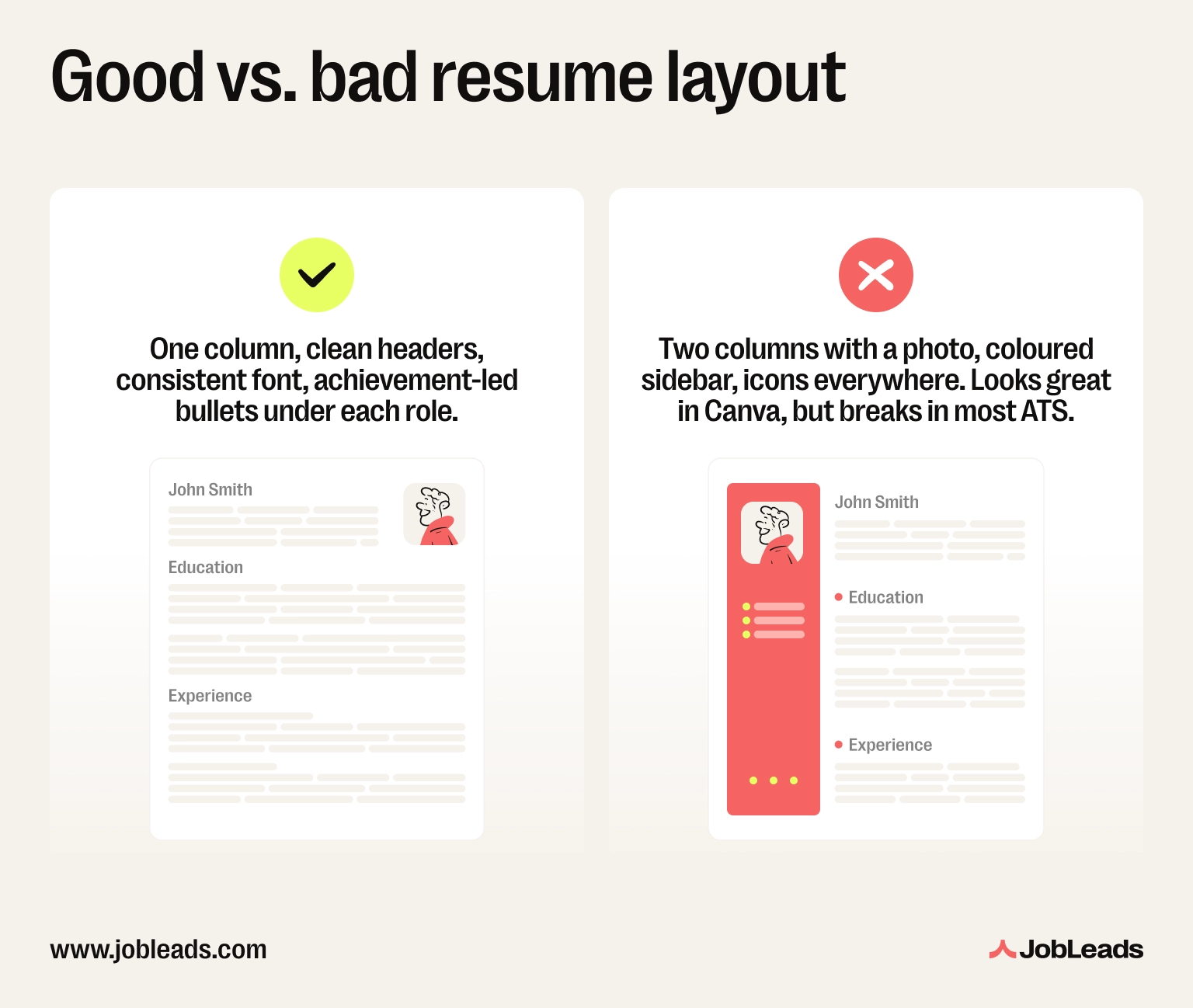
✅ Right: One column, clean headers, consistent font, achievement-led bullets under each role.
❌ Wrong: Two columns with a photo, coloured sidebar, icons everywhere. Looks great in Canva, but breaks in most ATS.
Why these two:
Here’s the standard top-to-bottom structure most recruiters expect:
The best resume fonts are clean and professional. Use sans-serifs or serifs at 10 to 12 points for body text and 14 to 16 points for headers. Here are the top picks for the font:
Pro-tip
Whatever font you pick, use one font family throughout the entire resume.
Formatting is where most resumes get filtered out. To format a resume well, use a single-column layout. Also, add standard section headers (Experience, Skills, Education) and use 10 to 12 point body text and consistent date alignment. At the end, save the document as PDF. Skip tables, text boxes, headers and footers, and graphics as these break ATS parsing.
A clean job resume format is not fancy. Instead, it’s predictable. Resume formatting that follows the standard professional resume format reads quickly to a recruiter and parses cleanly through an ATS. That is the whole job.
When it comes to the format, you have three options: reverse chronological, functional, and hybrid. Most people would do best with the first one, but there are exceptions.
So, which resume format should you use? Here’s a comparison table:
| Format | Best for | Avoid if |
|---|---|---|
| Reverse chronological | Most job seekers with steady work history | You have large employment gaps |
| Functional (skills-based) | Career changers, big gaps | You are applying via ATS (most don’t parse it well) |
| Combination or hybrid | Experienced candidates with a skills-first pitch | You are early career |
Read more: Learn how to optimize a resume for ATS and pass the screening. Also, check out how to tackle resume gaps and still get hired.
There is no creative wiggle room in this list. Break any of these six rules and the ATS may filter your resume out before a human ever sees your name.
Did you know that…
According to Jobscan, over 97% of Fortune 500 companies use an ATS to screen resumes. The most common reason a resume gets filtered out is poor formatting, not poor content.
The skills to include on a resume depend on the role. But the principle stays the same. Put a mix of hard skills (tools, software, certifications, languages) and soft skills (communication, leadership, problem-solving) on your resume. Also, prioritize the skills the job ad asks for and group them by category if you have over 10.
Hard skills are teachable and measurable. On the other hand, soft skills are how you work with people. You need both. But the ATS filters on hard skills first.
In fact, Jobscan found that as many as 76% of recruiters use the skills filter in their ATS. It is the most-used filter when narrowing down candidates. If your skills section is missing the exact terms from the job ad, you may never reach the human stage.
Did you know that…
According to a JobLeads analysis of over 1.2M listings, soft skills beat technical ones nearly 3 to 1 in US entry-level postings. In fact, communication (almost 31%) and customer service (over 27%) were at the top of the list and no technical skill came even close. The lesson is that a resume stacked only with technical skills is missing what employers ask for.
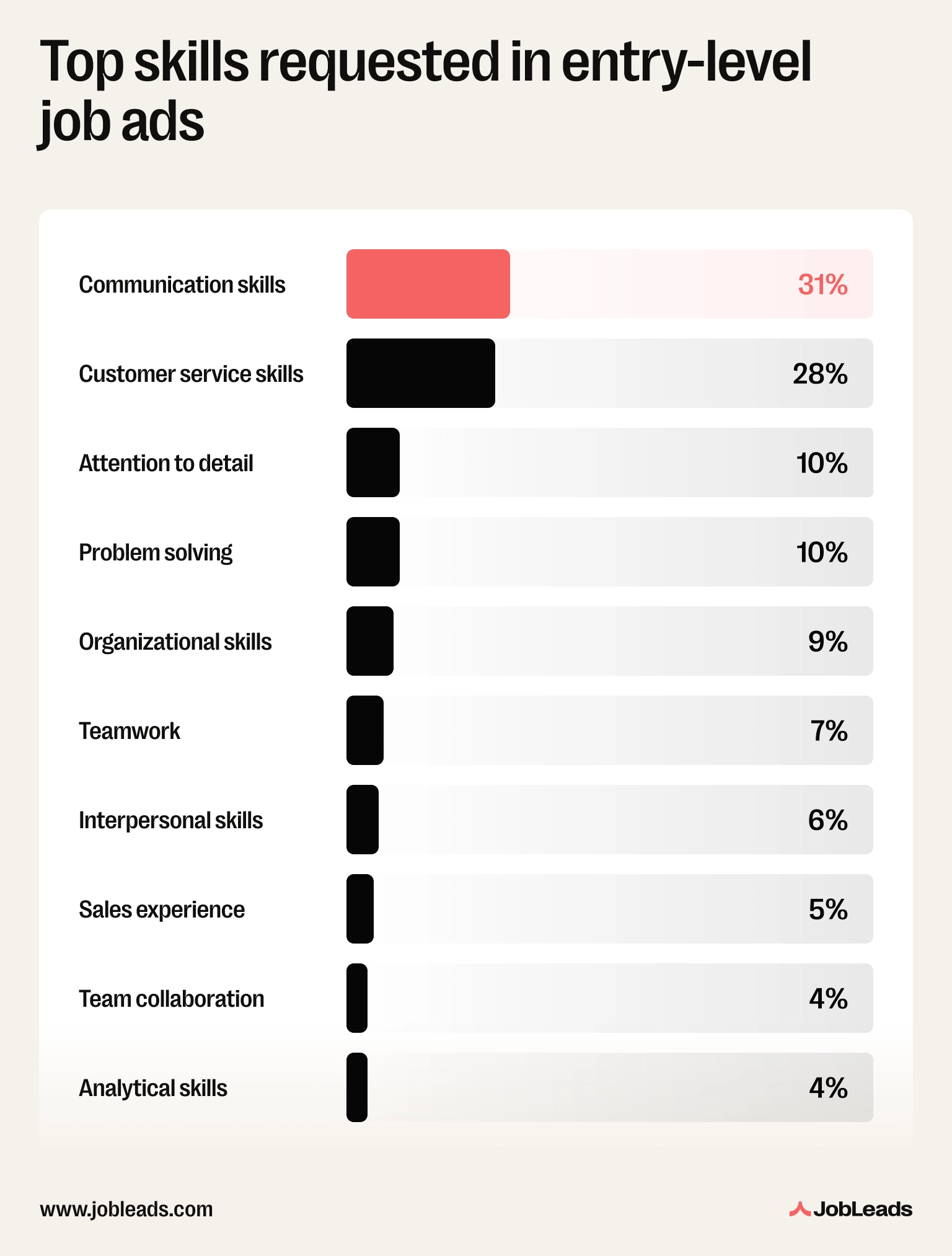
The easy answer is: pull them from the job description. Don’t copy a generic “top 10 skills” list but write “Salesforce” if the ad says “Salesforce.” It’s quite simple really if you keep in mind that the ATS is looking for an exact match.
Picking the right skills is half the battle. The other half is laying them out so the ATS and a recruiter can read them fast. Here are a few tips you can use:
Your work experience section is the biggest factor in whether you get the interview. It’s also where most people go wrong. Make sure to list work experience in reverse chronological order.
For each role, include the job title, company name, location, dates (Month/Year), and 3 to 6 bullet points.
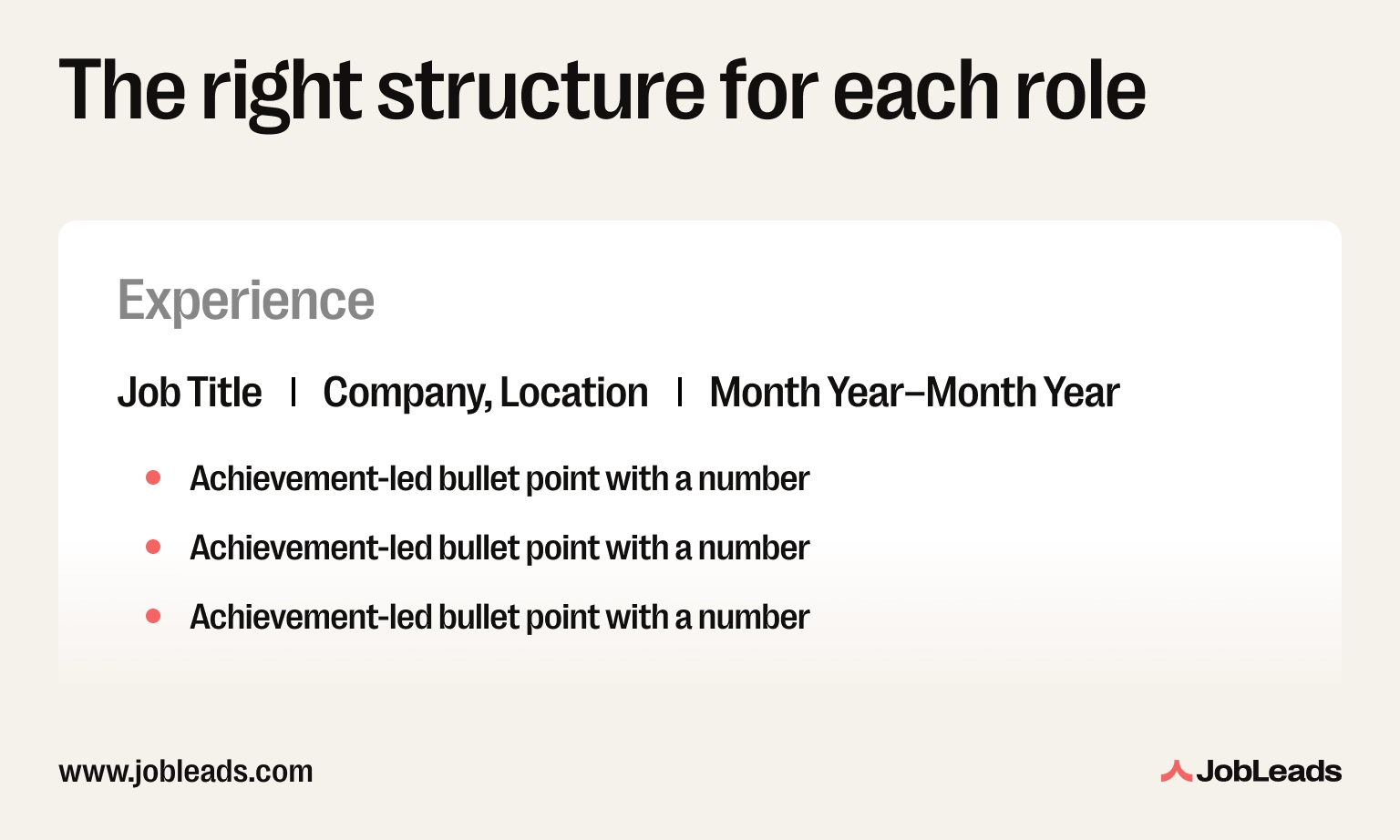
It’s important to remember that you should write achievements, not duties. Opt for writing about what you accomplished with numbers instead of a vague list of responsibilities.
This is the top fix that makes a resume stand out. Every bullet should answer: “So what? What changed because you did this?”
✅ Right: “Launched a referral programme that generated 32% of new customer sign-ups and saved around $40K in paid acquisition costs.”
❌ Wrong: “Responsible for managing the referral programme and working with the marketing team.”
Did you know that…
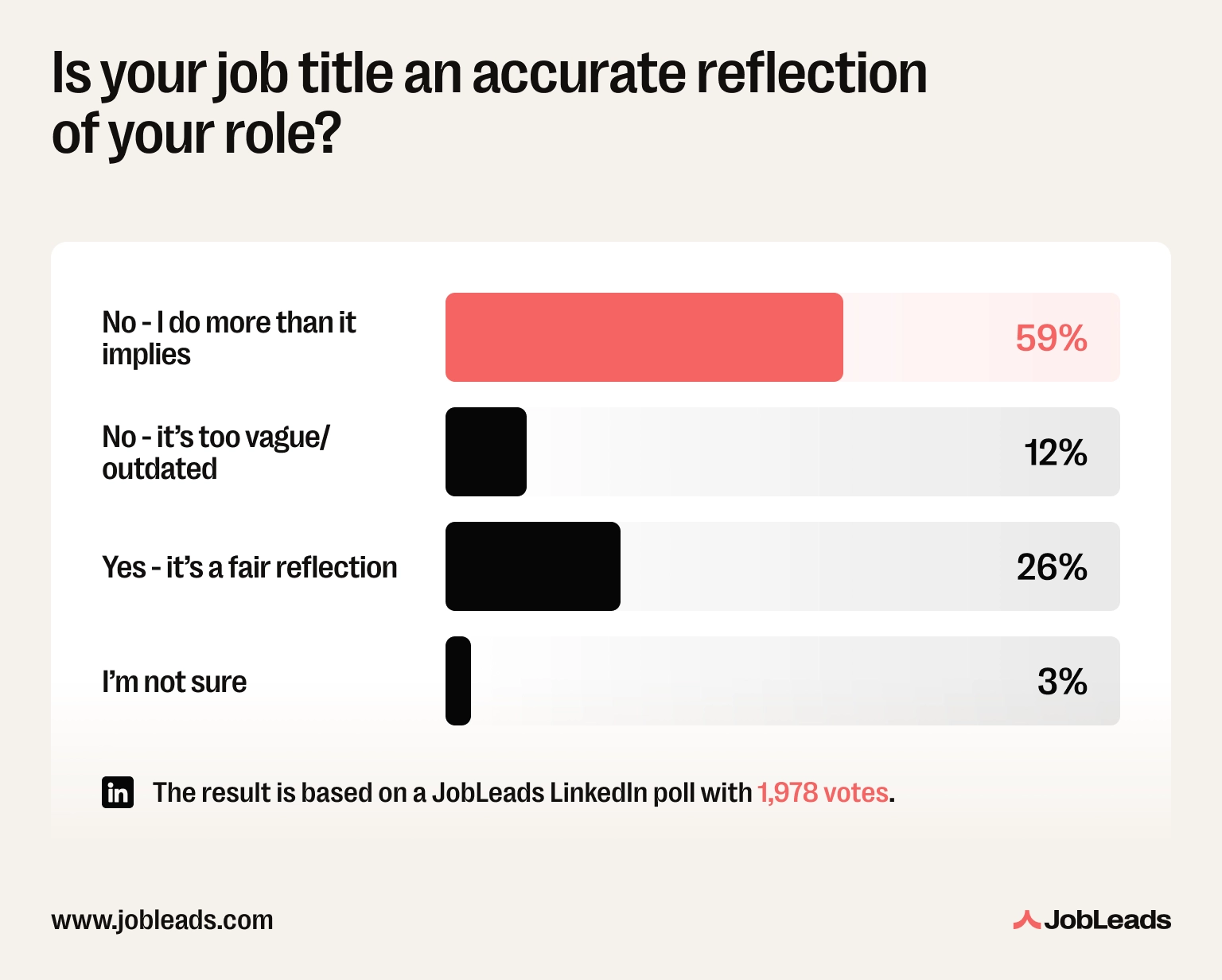
In a JobLeads survey, as many as 59% of professionals said their job title does not reflect what they actually do. They answered “No, I do more than it implies.” Your title does not tell your story. Your achievements do.
Have you ever heard of the XYZ formula?
It was made famous by a former Google recruiter, and it works because it forces specificity:
Accomplished [X], as measured by [Y], by doing [Z].
Example: “Reduced customer onboarding time by 40% (from 10 days to 6) by redesigning the welcome flow and automating three manual steps.”
Also, lead with power verbs: Led, Built, Launched, Reduced, Increased, Designed, Negotiated. Skip weak starters like Responsible for, Helped, Worked on. They say nothing.
Pro-tip
If you cannot put a number on a bullet, ask yourself: “compared to what?” You’ll usually find one.
A good rule of thumb is using 3 to 6 bullet points per job on a resume. Give your most recent and relevant roles the full 5 to 6. Older or less relevant roles get 2 to 3. But remember that every bullet should earn its spot. If it doesn’t show a measurable achievement or a relevant skill, cut it.
A simple rule for deciding:
List education in reverse chronological order. Include the degree, institution, location, and graduation year. Add your GPA only if it’s 3.5 or higher and you graduated in the last 3 years. Moreover, certifications, relevant coursework, and honors go under the education entry.
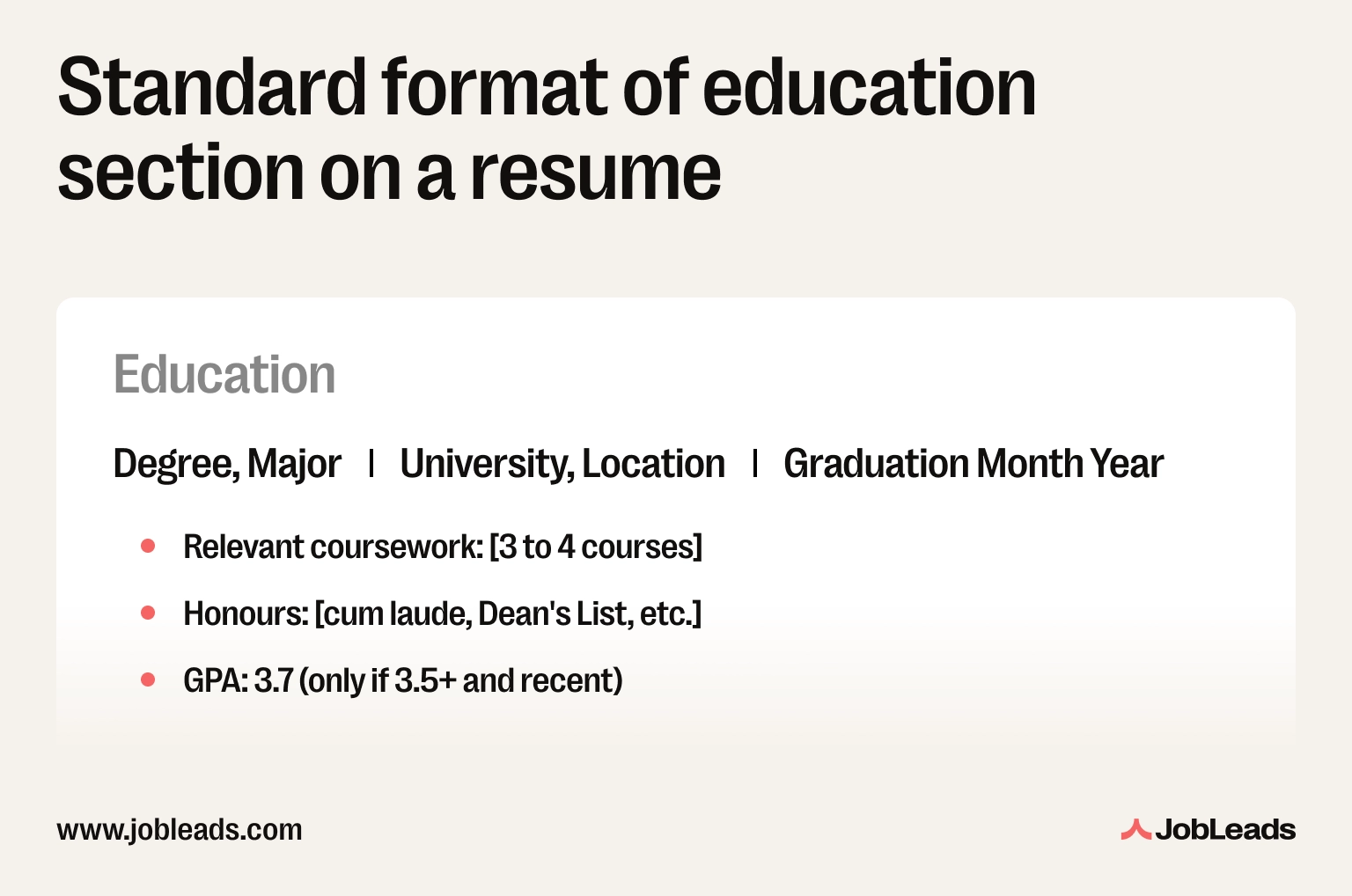
Where you place this section depends on where you are in your career. Recent graduates and students should put education near the top, above work experience. Experienced professionals push it below work experience–once you have a few years on the job, your career story matters more than where you studied. But, career changers with a new relevant degree go near the top as the degree is the reason for the move.
✅ Include: Degree, school, graduation year, honors, relevant coursework (if recent), certifications, academic projects.
❌ Skip: High school, GPA under 3.5, dates if you graduated over 15 years ago.
If you have directly relevant certifications (PMP, AWS, CPA, Google Analytics), give them their own “Certifications” subsection. Include the issuing body and the date as recruiters tend to check those.
Pro-tip
Still studying? List your degree as “expected Month | Year.” Recruiters prefer clarity over guesswork.
To write a resume with no experience, start with a strong objective statement. Emphasize relevant coursework and academic projects. Also, add internships, volunteer work, freelance projects, and transferable skills. Focus on what you have done, not what you have not.
So, here are a few steps to follow:
Pro-tip
Apply for 1 to 2 short projects (Upwork, a nonprofit, or a friend's business) just to put real work on your resume.
List volunteer experience on your resume when it’s relevant to the job, fills an employment gap, or shows a skill you are otherwise missing. Format it the same way as paid work, so include the role, organization, dates, and 2 to 3 achievement-led bullets under a “Volunteer Experience” heading.
When to include it:
When to leave it off:
Example: Tom was applying for a product manager role after a year-long career break. He listed six months of volunteer work running a community coding club. He framed it as “led a 12-person volunteer team” and “designed and delivered an 8-week curriculum to 40 students.” He landed two interviews in three weeks.
Okay, let’s put it all together now and make it catch the recruiters’ eyes.
The recipe for standing out is short: tailor every resume, lead with numbers, optimize for ATS keywords, and cut everything generic.
Tailoring isn't optional. Generic applications get filtered out, so spend ~15 minutes per role rewriting your resume summary and top 3 bullets. Pull 8-12 keywords from the job ad and weave them into your skills, summary, and bullets.
The payoff is real: Jobscan found candidates whose resume includes the exact job title from the posting are nearly 11x more likely to land an interview. Same role, same experience, the only difference were the words on the page.
Numbers are the next differentiator. If you can put a percentage, a dollar figure, or a timeframe on a bullet, do it.
Did you know that…
In a JobLeads survey, as many as 45% of job seekers said the biggest mistake that cost them an opportunity was underselling themselves. Generic, duty-led bullets are exactly how you undersell yourself on paper.
Your professional summary is where most recruiters look first. Use 3 to 4 lines at the top, in this format:
[Role + years of experience] + [2 to 3 core strengths] + [headline achievement].
✅ Right: “Senior marketing manager with 8 years of B2B SaaS experience. Specialist in paid acquisition, lifecycle marketing, and content strategy. Scaled MRR from $400K to $2.1M at [Previous Company] in 18 months.”
❌ Wrong: “Motivated marketing professional seeking a challenging opportunity to grow.”
Last but not least, cut the filler. Remove “team player,” “hardworking,” “results-driven,” etc. They say nothing. Choose specifics instead.
Senior candidates can add a “Selected Achievements” section at the top–3 to 4 career highlights before work experience–to make the recruiter's 7 seconds count.
Also, remember to proofread before submitting your application. Read it out loud, run it through Grammarly, and ask a friend to ensure you’re happy with the results.
Pro-tip
Save your tailored resume with the job title in the file name. For example: John-Smith-Resume-SEO-Lead.pdf. Recruiters notice.
A great resume is not about clever design or buzzwords. It’s about clarity and tailoring. So, to write a successful resume you should prepare before you write, lead with measurable achievements, and format for both machines and humans. Also, don’t forget to rewrite the document for every role.
Whether you’re making a resume for the first time or rebuilding one after years out of the market, the rules are the same. Do that, and you are already ahead of the 98% of resumes that never make it past the first scan.
The fastest way to get there is with a platform built for it. For example, JobLeads is the all-in-one resume builder for serious job seekers. It combines ATS-tested templates, AI-powered tailoring, a free resume review, and over 15M live job matches in one place. Stop sending resumes into the void. If you want to create a resume that actually lands interviews, JobLeads is built to help you do exactly that.

Content & Insight Writer
Beata creates content that puts job seekers first. From practical blog advice to first-hand research studies, her writing is designed to give people the clarity and confidence to find the role they deserve.
ResumeLooking for an AI resume builder to help with your CV? Compare the best AI resume writing tools, paid and free, based on the main features and top use cases.
 Job Search
Get recruiter tips straight from the source. From tailoring your resume to following up after interviews, here’s what hiring managers actually want to see.
 Job Search
Are you tired of companies demanding experience for entry-level jobs? Here’s why they do it, and how to beat them at their own game.