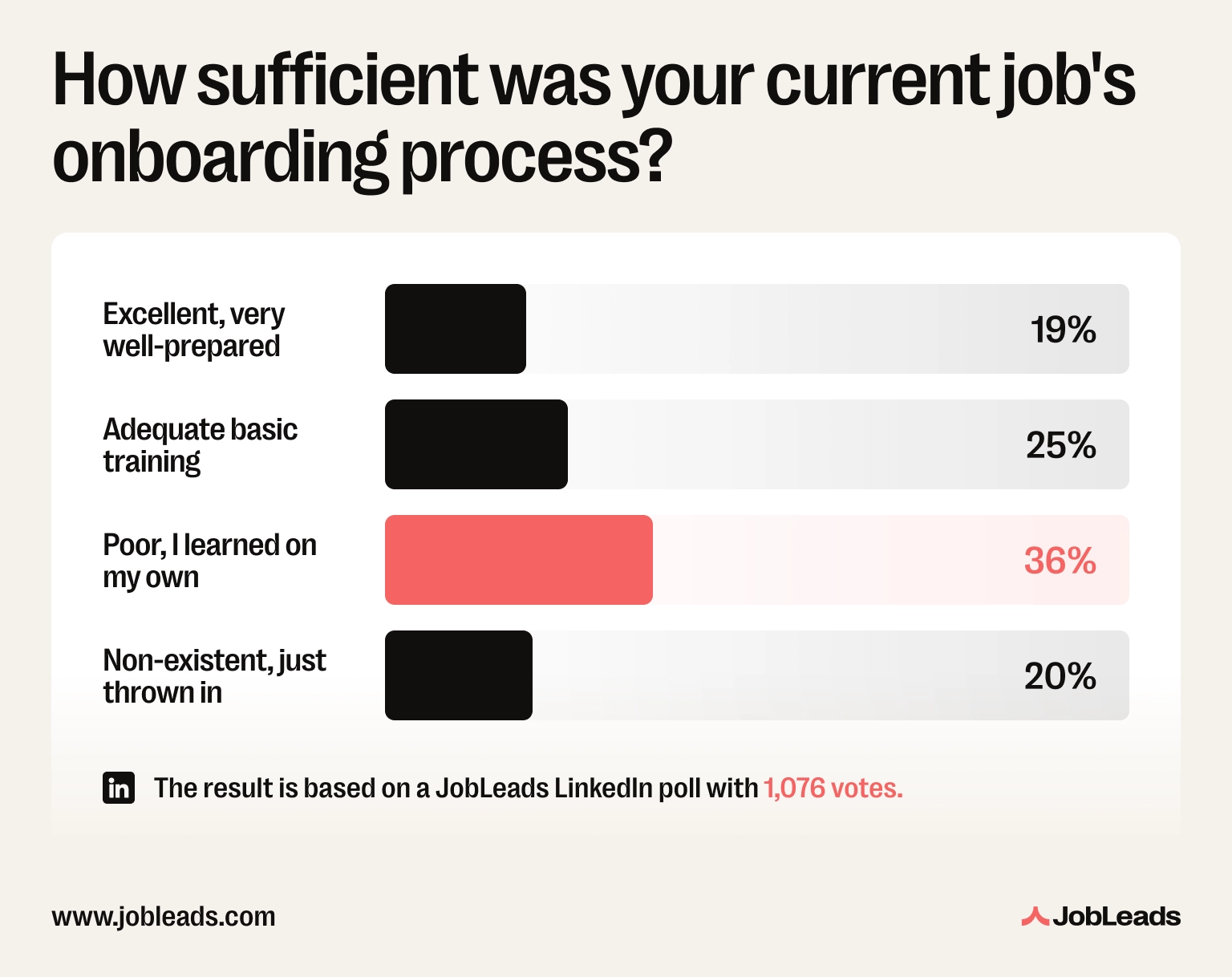
JobLeads asked professionals how sufficient their current job's onboarding was. Only 19% called it excellent. The majority (56%) describe their own onboarding as poor or non-existent.
That's not a small-company problem or a one-off. In fact, Gallup's outside research found that only 12% of employees strongly agree that their company does a great job onboarding new hires.
And remote roles make it worse–
There's no desk to walk past, no hallway conversation to overhear, no one to physically hand you a laptop on day one.
So–whether you're the one starting a new remote job or the one setting up someone else's first weeks, this remote onboarding guide will show you all you need to know.
Key takeaways
About 56% of professionals call their own onboarding "poor" or "non-existent" (JobLeads)
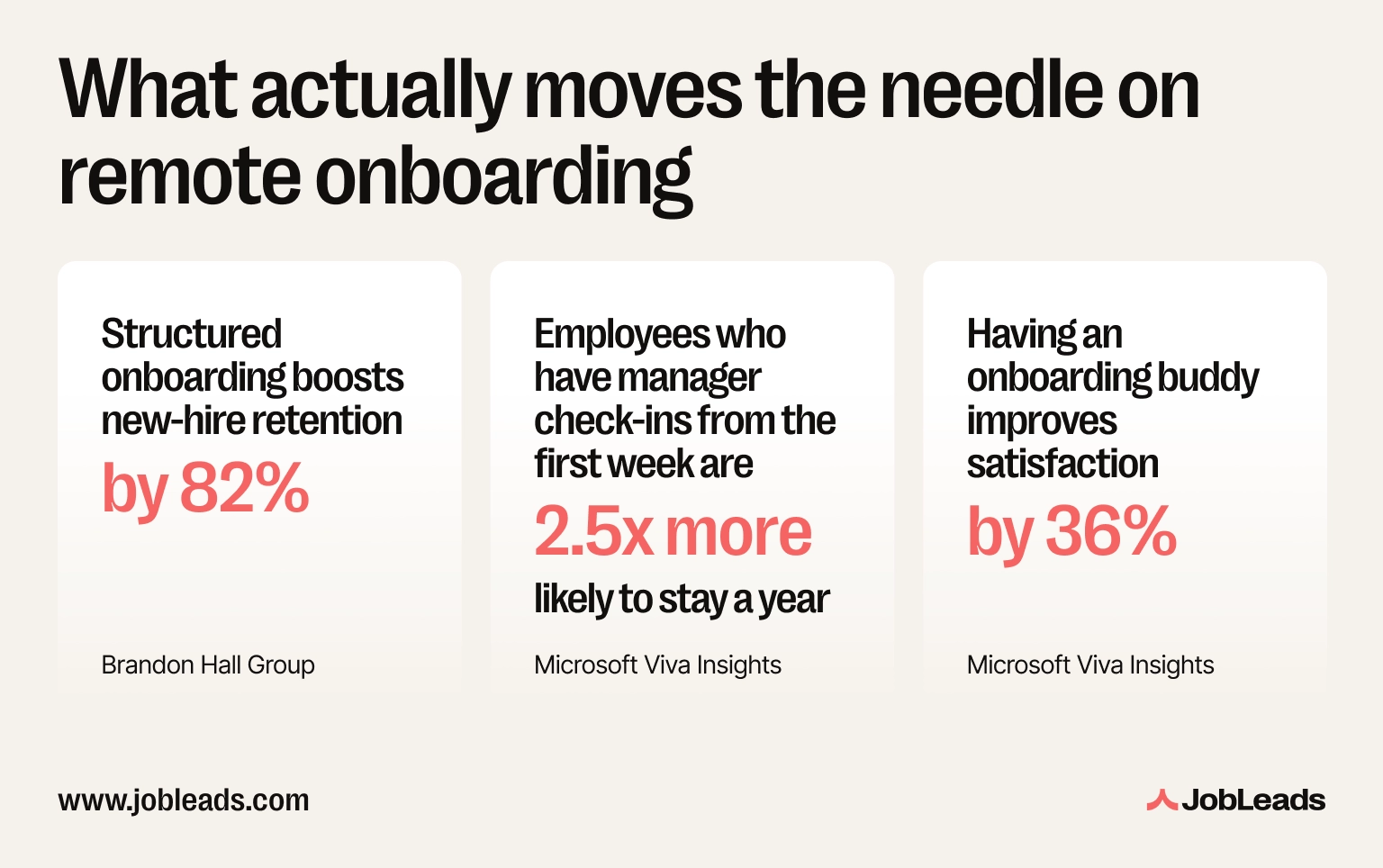
Structured onboarding lifts retention by up to 82% and new-hire productivity by over 70% (Brandon Hall Group research)
New hires whose manager checks in during week one are 2.5x more likely to stay a year (Microsoft Viva Insights)
Remote workers report feeling lonely at work at roughly 24%, about double the 12% reported by on-site employees (Gallup)
As a new remote employee, your prep work starts before day one: workspace, tech, and mindset
As an employer, the highest-leverage moves are a buddy program, scheduled manager check-ins, and a written 30-60-90 day plan
If you're the one joining remotely, the burden of a smooth start falls more on you than it would in an office. Nobody's going to walk over and introduce themselves. You have to build that structure yourself before it's built for you.
Before your first day, get the practical layer sorted so it's not competing for attention with everything else that's new.
A dedicated, quiet workspace: even a corner of a room, with a door you can close for calls
Your own reliable internet and a backup plan (mobile hotspot, nearby café with wifi) in case it drops during an onboarding meeting
Working camera, mic, and headphones: tested the day before, not during your first team call
Company accounts and access confirmed (email, HR portal, Slack/Teams, VPN): chase IT before day one if anything hasn't arrived
Your calendar synced to the company's time zone: remote onboarding often spans regions, and a timezone mixup on day one is an avoidable bad first impression
Remember to test your video call setup, including the camera, mic, lighting, and connection, 24 hours before your first day. Don't leave it till the morning. It's the single easiest way to avoid a chaotic first impression.
The practical checklist is the easy part. The harder part is that remote onboarding gives you fewer natural cues than an office does. There's no one to read body language off, no hallway to overhear context in.
Gallup's State of the Global Workplace research found that remote employees report feeling lonely at work about 24% of the time–roughly double the 12% reported by on-site employees. That gap is widest in the first few weeks, before you've built any real relationships.
JobLeads' own research backs this up: 37% of professionals say remote work has made it harder to build genuine relationships with colleagues. But the picture isn't uniformly bleak–a striking 43% disagreed, saying distance doesn't matter, while another 12% said it takes more time but goes deeper. Knowing this, you should treat your first two weeks as the window where you deliberately over-communicate.
The relationship-building won't happen on its own, you have to be deliberate about it. Here's what that looks like in practice:
Turn your camera on for calls, especially in week one: it's a small thing that measurably changes how included you feel
Ask more questions than feel comfortable: remote managers can't see confusion on your face, so you have to say it out loud
Block time for a proper lunch break away from your screen: remote days blur together without a physical commute to bookend them
Set a hard stop time for your first week: new remote hires tend to overwork trying to "prove" themselves, which builds burnout before month one is even over
✅ Right: "Hey, quick one–I wasn't 100% sure which Slack channel this question belongs in, wanted to check before I posted."
❌ Wrong: Staying quiet for two weeks because you don't want to seem like you're struggling.
Read more: See our remote interview tips if you're still in the interview stage and want to ace it.
This works as a remote onboarding checklist for new hires generally, not just a personal to-do list. Use it as a simple remote onboarding template–copy it into your notes app and check items off as you go.
Test tech setup (camera, mic, internet, backup connection) → day before
Confirm all accounts and logins work: email, HR system, chat, VPN
Set up your workspace: desk, lighting, headphones within reach
Introduce yourself in the team channel: short, human, not a formal bio
Schedule 1:1s with your manager and 2-3 close teammates in week one
Find (or ask for) an onboarding buddy
Write down your first 30-60-90 day goals as you understand them, and confirm with your manager
Block a real lunch break and a hard stop time daily
Flip the perspective. If you're the one onboarding a remote hire, the same lack of physical cues that makes it harder on the employee makes it just as easy for you to under-invest without noticing. But the effort pays off. Brandon Hall Group research found that companies with a strong onboarding process see 82% higher new-hire retention and productivity gains of more than 70%. That's the return on getting it right.
The remote onboarding best practices below work whether you're setting this up for one hire or fifty.
Owl Labs' State of Hybrid Work report found 85% of employees say good technology is a top factor in their work life. Equipment is exactly the piece that most often gets left until the week of a new hire's start date, instead of being planned around the offer date. It's also one of the most avoidable failures in remote onboarding.
Have this ready before day one, not on it:
Laptop, monitor, and peripherals shipped and confirmed delivered: with tracking, not just "it should arrive"
All accounts provisioned in advance: email, HR system, chat, project management tool, time tracking tool, VPN, any role-specific software
A written first-day agenda sent 2-3 days ahead, so the new hire knows what to expect and isn't guessing
A welcome message in the team channel, posted before their first login so they walk into a channel that already knows they're arriving
✅ Right: Equipment ships the week the offer is signed, with a tracked delivery date confirmed before day one.
❌ Wrong: IT ticket for a new laptop gets opened the same week the employee starts.
This holds regardless of where the new hire is based. Onboarding remote employees in Latin America, Europe, or Asia follows the same core structure. The only difference is that you'll just need to adjust for local labor law, public holidays, and payroll timing.
A login and a laptop are the floor, not the plan. Remote employee onboarding best practices center on a written plan because without physical proximity, nothing gets communicated by osmosis. If it's not written down and scheduled, it doesn't happen.
Harvard Business Review reports that nearly 90% of new hires decide within their first six months whether they intend to stay or leave. It also cites Deloitte's research on the "dead zone"–the gap between signing an offer and day one, where silence from the employer fuels early disengagement. That's the case for sending a written first-day agenda and scheduling buddy/manager introductions before day one, not during it.
Build a simple 30-60-90 day plan before the employee's first day:
First 30 days: Learn the remote work tools, meet the team, understand how work actually gets done
Days 30-60: Take ownership of small, well-scoped tasks with regular check-ins
Days 60-90: Operating with more independence, contributing to team goals with lighter oversight
Balance synchronous and asynchronous onboarding activities. Don't load the new remote hire's calendar with back-to-back video calls in week one. It's exhausting and teaches them nothing about how the team actually works day to day.
Tool training, process documentation, anything reusable later
The process changes weekly are hard to keep up to date
Written docs
Reference material, policies, anything a new hire will need again
Used as the only format can confuse the hire
Group team calls
Culture, intros, team rituals
Overused for 1:1-style content buries individual questions
Here's one of the real remote onboarding examples that makes this concrete:
Note
Example: Daniel manages a 12-person remote design team. His old onboarding was a single 3-hour call on day one. Safe to say: new hires forgot most of it by day three. He switched to a mix: a recorded async tool walkthrough sent before day one, three short 1:1s spread across week one, and a written 30-60-90 plan shared on day one. New-hire ramp-up time dropped from roughly six weeks to four.
In an office, a new hire absorbs the org chart just by walking around. Remotely, every relationship has to be deliberately scheduled as nobody meets anyone by accident.
Prioritize these meetings in the first two weeks:
Direct manager: daily or every-other-day check-ins in week one, tapering to weekly
Onboarding buddy: a peer (not the manager) for the questions that feel "too small" to ask upward
2-3 closest teammates: the people they'll actually collaborate with day to day
Cross-functional contacts: anyone in adjacent teams they'll need to work with in month one
Leadership intro: a short, informal call in week two or three, not day one
Microsoft's internal research on onboarding buddy programs found new hires with a buddy were 23% more satisfied with onboarding after week one, rising to 36% at 90 days. Interestingly, manager check-ins matter even more directly as new hires whose manager checked in during week one were 2.5x more likely to stay with the company for a year.
Use this as your remote onboarding plan template, or simply as a set of guidelines. Naturally, you should adapt the specifics to your team, but keep the structure.
Ship equipment the week the offer is signed–confirm delivery before day one
Provision all accounts and access in advance
Send a written first-day agenda 2-3 days ahead
Post a welcome message in the team channel before login day
Assign an onboarding buddy (not the manager)
Schedule manager check-ins for week one — daily or every other day
Write and share a 30-60-90 day plan on day one
Schedule intros with 2-3 close teammates and any cross-functional contacts
Balance live calls with async docs/videos but don't overload the calendar
Check in explicitly at the 2-week and 30-day marks on how the remote onboarding experience itself is going, not just task progress
Tip
Ask new hires directly, at 30 days: "What's one thing about onboarding you wish had been clearer?" It's the fastest way to fix your process before the next hire.
Most remote onboarding failures trace back to a handful of repeated mistakes on both sides of the process.
Treating onboarding as a single day, not a 90-day process: a great first day with no follow-through still produces a lost new hire
Overloading the calendar with live calls: video fatigue kills retention of information faster than any other single factor
No written plan: if the 30-60-90 days aren't written down, they don't happen consistently
Assuming silence means understanding: remote managers can't read a confused face, so if a new hire hasn't asked a question in days, check in
Skipping the buddy: a manager relationship alone doesn't cover the "dumb question" gap a peer buddy fills
Read more: If these mistakes pile up and you're seriously questioning the decision, our guide on whether you should quit your job walks through how to tell a rough start from a genuinely wrong fit.
Everything that used to happen automatically in an office–hallway intro, the over-the-shoulder help, the read of a new hire's body language–has to be deliberately rebuilt when nobody's in the same room.
The good news is that there's a fix to all of it.
A written plan, scheduled check-ins, and a buddy close most of the gap. Whether you're the one starting the job or the one setting it up, the process above is the difference between a new hire who's productive in a month and one who's still guessing in the third month.
Looking for your next remote role?
Skip the guesswork on culture and onboarding–sign up to JobLeads and get matched with roles that fit.
Beata creates content that puts job seekers first. From practical blog advice to first-hand research studies, her writing is designed to give people the clarity and confidence to find the role they deserve.
Frequently asked questions
Remote onboarding is the process of integrating a new employee into a company primarily online. This covers equipment setup, account access, training, and team introductions without an in-person office to rely on. Some companies call it virtual onboarding instead–same process, different name.
Most structured remote onboarding plans run 90 days, broken into three phases. First is about learning tools and the team (30 days). The next is taking on scoped tasks (day 30 to day 60). And lastly, operating with more independence by days 60-90.
Confirm your workspace, test your tech (camera, mic, internet, and a backup connection), make sure all accounts and access are working, and set your calendar to the company's time zone before day one.
At minimum: a laptop, monitor, and any role-specific peripherals, shipped and confirmed delivered before the start date. Plus every account and software login provisioned in advance, not on day one.
Post a welcome message in the team channel before their first login, assign an onboarding buddy, and schedule manager check-ins throughout week one. Also, introduce them to 2-3 close teammates in the first two weeks.
At a minimum: tested tech setup, confirmed account access, a written first-day agenda, an assigned buddy, scheduled 1:1s with the manager and teammates, and a documented 30-60-90 day plan.
Remotely, nothing happens by accident. Every introduction, relationship, and piece of context has to be deliberately scheduled or written down. In an office, much of that happens passively just by being in the building.


 Job Market Trends
