
 Job Interviews
May 27, 2024
What's an elevator pitch - and how will it land me great jobs?
Learn what an elevator pitch is, how to create one, and how it can land you great jobs. Find tips, examples, and templates for crafting your perfect pitch!

In ancient Rome, job candidates literally wore their intentions. The word candidatus comes from the Latin for white and men seeking office rubbed chalk into their togas to signal purity and trustworthiness as they walked the forum.
The forum is now a Zoom call. The chalk is a ring light. But the stakes are identical: you have about 100 milliseconds to make a first impression, and how you show up, even before you've said a word, already counts.
Here are remote interview tips on how to show up well and make a great first impression.
Here's the thing about digital interview tips: most candidates think preparation means rehearsing their answers. It does, but that's only half of it. The other half is everything that happens before you even say hello.
So, what are the crucial things to remember in your preparation for the virtual interview?
Run a full tech check at least 24 hours before. Test your internet speed, install or update the video tool, and check that your mic and camera work well. Keep in mind that a wired connection is more reliable than Wi-Fi if you have the option. Also, if you've never used Zoom, Microsoft Teams, or Google Meet before, create a free account and run a test call with a friend.
| Platform | Best known for | Key tips |
|---|---|---|
| Zoom | Most widely used by recruiters (about 55% share) | Use “raise hand” to interject without talking over someone |
| Microsoft Teams | Corporate and enterprise hiring | Background blur is built in, so use it if your space isn't camera-ready |
| Google Meet | SMEs and Google Workspace companies | Keep an eye on the chat panel as interviewers sometimes drop notes there |
The part most candidates skip: doing a full trial run on the same platform the recruiter is using. Not just opening the app but actually running a mock call so you know where the mute button is and how to share your screen if asked.
Moreover, you need to prepare a backup plan. What will you do if the platform crashes? What if your internet cuts out? Think it through in advance. Candidates who handle tech failures calmly tend to impress interviewers even more than candidates who never experience a glitch at all.
Pro-tip
If it’s available, save the recruiter's phone number before the interview starts. If your connection drops mid-call, you can switch to audio immediately rather than sending a panicked email and waiting.
Your background, lighting, and camera position are all non-verbal clues that the interviewer is picking up on. Make sure what they're saying is positive.
For your background: a plain wall or a tidy, uncluttered bookshelf works well. Avoid virtual backgrounds unless your space genuinely isn't camera-ready. These can glitch and they create a slightly artificial impression.
For lighting: your light source should be in front of you, not behind you. Sitting with a window behind you turns you into a silhouette. Natural light from the front is ideal but a ring light or a lamp positioned in front of you works just as well.
For your camera: it should be at eye level. If you're using a laptop on a desk, prop it up on some books. Looking down at the camera reads as disengaged on screen, even if you're not.
Did you know that…
A Princeton University study by Willis and Todorov found that people form trait judgements about a new face in as little as 100 milliseconds. This is faster than a blink. On a video call, that impression is shaped almost entirely by your setup and your energy before you've said much at all.
This one sounds obvious. It isn't though, based on how often it catches people out.
So, research the company's dress code before the interview. Check their website, their LinkedIn, their social media. Are they a suit-and-tie firm or a hoodie-and-sneakers startup? Dress for the culture you're trying to join or one level smarter if you're not sure.
And dress fully. It's tempting to wear a smart top and comfortable tracksuit bottoms when you're sitting down. That's fine–until you stand up to reach something, and your interviewer sees your teddy-themed pyjama bottoms.
Pro-tip
Wear an outfit you've worn before and feel confident in. A video interview is not the day to break in a new shirt that sits awkwardly.
Most candidates research the company's products, their LinkedIn page, and their recent news. Far fewer research how the company actually works day-to-day.
Before a digital interview, look for signals about their remote culture. Do their job ads mention async communication? Does their Glassdoor page have reviews that mention remote work positively or negatively? Do they have a public remote work policy?
It also helps to understand the full pros and cons of remote work before you walk in. This way, you can ask smarter questions and show you've genuinely thought about what distributed work requires, not just what it offers.
You've done the prep. Now you're on the call. These tips will help you make the most of it, from the moment you join to the follow-up email you send afterwards.
Turning your camera off in a video interview, unless you've had a genuine technical emergency, reads as disengagement.
Also, arriving 2-3 minutes early has two benefits. First, it signals that you're reliable. Second, it gives you time to catch any last-minute tech issues before the call officially starts. If there's a waiting room, use that time to take a breath and settle in.
Body language doesn't disappear on video, it just gets compressed and slightly distorted. That means you have to be more deliberate about it.
So, keep eye contact with the interviewer's face on screen and sit upright. Also, nod to show you're listening and avoid swivelling in your chair or fidgeting with anything on your desk. Moreover, smile naturally as video compresses expression, so a neutral face can read as cold when it isn't.
Stanford researcher Jeremy Bailenson found that video calls create “nonverbal overload.” Our brains work harder to decode compressed social cues through a screen. That extra effort means the signals you send carry more weight than they would face to face.
Put your phone on silent and face-down or in another room. Close your pets out. If anyone else is home, let them know you're in an important call and put a sign on your door if you need to.
The goal is to give yourself the best possible conditions to focus. Interviewers are generally understanding when a dog barks once. They're less understanding when you break eye contact to look at your phone three times in twenty minutes.
Tech failures happen even to people who have a good setup and fast internet connection. The question is all about how you handle it.
If your connection drops: rejoin immediately. Don't send a lengthy apology email. Just come back, briefly acknowledge it (“Sorry about that, my connection dropped for a second”), and pick up where you left off. Interviewers respect composure.
If your audio fails: type in the chat that you're switching to phone, then join the interview through your phone. You can also ask to join through a different computer if that’s an option for you.
If the platform crashes entirely: email the recruiter immediately and ask whether to rejoin or reschedule. A short, professional email sent just in time tells them a great deal about how you'd handle a crisis at work.
One of the most valuable virtual job interview tips is also the most overlooked: ask questions that are actually about remote work. Most candidates arrive at the end of an interview and ask only about career progression or company culture. These are fine questions, but not specific enough for a remote role.
The questions you ask signal whether you've genuinely thought about what remote work requires or whether you're just hoping it means you can work from bed.
Ask things like:
These show self-awareness about remote work dynamics. They also give you genuinely useful information about whether the role is right for you.
Did you know that…
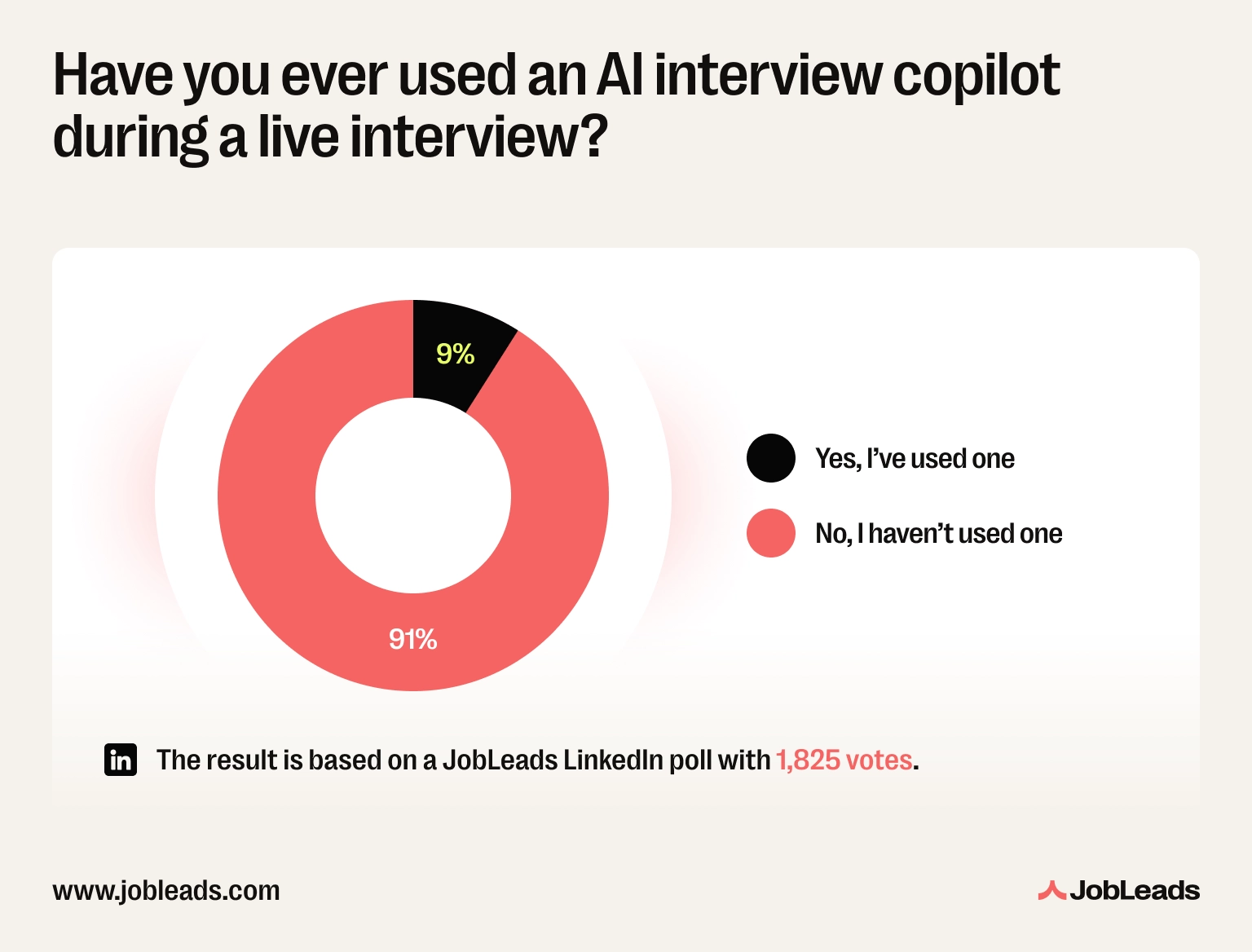
According to a JobLeads LinkedIn survey, a whopping 91% say they haven't used an AI interview copilot during a live interview. Only about 9% admit to secretly using one to help them perform better in real time. That majority instinct is right–recruiters are increasingly aware of AI-assisted answers, and authenticity remains the strongest differentiator.
Following up after a remote interview is not optional if you're serious about the role.
Send a short thank-you email within 24 hours. Reference something specific from the conversation, like a topic you discussed or a challenge they mentioned. Generic thank-you emails are almost indistinguishable from no email at all.
You can also connect on LinkedIn with a brief note, not just the default “I'd like to add you to my network.” Reference the conversation and keep yourself top of mind.
According to a TopResume survey, as many as 68% of hiring managers say a thank-you note after an interview impacts their decision-making process.
There's an old story about Socrates, one of the earliest “interviewers” in history.
He walked through Athens asking people simple questions: What is courage? What is justice? What makes a good life?
Politicians, poets, and generals all believed they had the answers. But Socrates kept probing. And something strange kept happening: the more people answered, the more their certainty unraveled.
This became known as the Socratic method, arguably the first form of structured interviewing. Not designed to extract information, but to reveal how someone thinks. Plato later distilled the spirit of it into a line paraphrased ever since: “I know that I know nothing.”
What made Socrates dangerous wasn't that he had answers. It was that his questions exposed weak thinking.
The remote interview works the same way. The best questions don't test what a candidate knows. They test how someone thinks, especially when the conditions for thinking are distributed, async, and sometimes isolating.
Here are the most common remote job interview questions and answers, with a breakdown of what interviewers are really looking for and how to respond.
What they're really asking: is this a genuine preference for how you work, or just lifestyle convenience?
❌ Wrong: “I hate commuting and I like having flexibility.”
Why it fails: it's honest, but it's entirely about what remote work gives you, with no signal about what you give back. It tells the interviewer nothing about your ability to work independently.
✅ Right: “I've found I do my best focused work when I can control my environment. I've built strong habits around structured communication and proactively keeping people informed which means that I don't need to be in a room with someone to collaborate effectively.”
Why it works: specific, self-aware, and directly addresses the interviewer's underlying concern.
Read more: Not sure how to articulate what draws you to remote work? Check out the benefits of working remotely and what makes it worthwhile, for both employees and employers.
What they're really asking: do you have actual systems, or do you drift?
Vague answers about being “self-motivated” or “disciplined” are red flags. Every candidate says they're self-motivated. Specificity is what separates you.
❌ Wrong: “I'm very self-motivated and disciplined, so it's never really been an issue for me.”
✅ Right: “I work in focus blocks, usually 90 minutes on, then a short break. I keep a daily task list and review it the night before so I'm not making decisions about priorities in the morning. I also set a firm end time so I don't blur into the evening.”
This answer shows a real system. It's also subtly reassuring to a hiring manager who worries about remote employees either underperforming or burning out.
What they're really asking: can you build trust and maintain relationships without proximity?
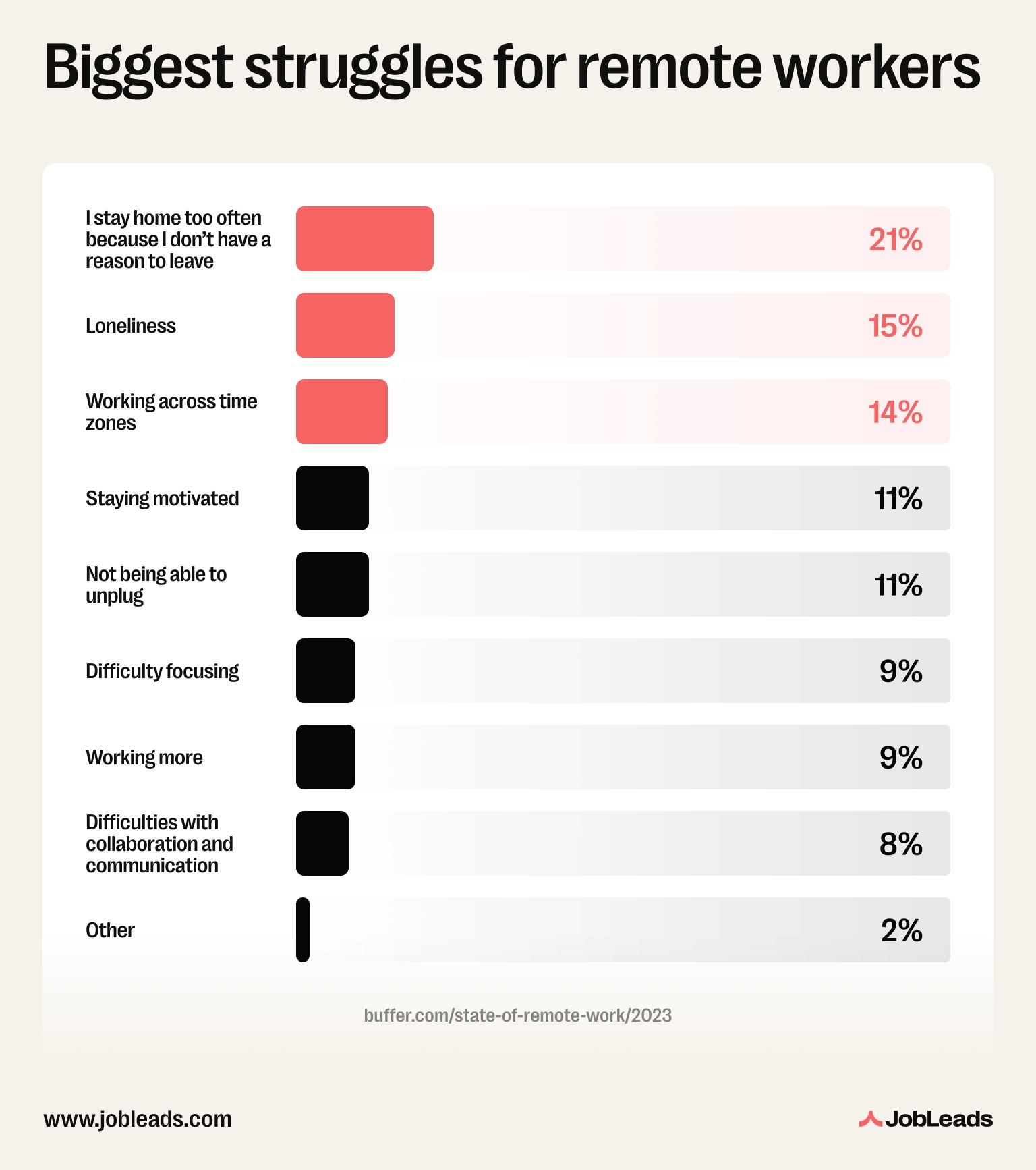
According to Buffer's State of Remote Work, about 15% of remote workers say collaboration and communication is still their biggest challenge. This question is trying to find out whether you'll become part of that statistic.
❌ Wrong: “I'm a strong communicator, so it's never really been a problem.”
✅ Right: “I tend to over-communicate by default in a remote setting. Not in a noisy way, but I make sure people always know where I am on a project without having to ask. I use video for conversations that matter and async for everything that doesn't.”
What they're really asking: are you flexible, organised, and considerate of others' schedules?
❌ Wrong: “I'm pretty flexible, I can work at different hours.”
Why it fails: no structure, no specifics. This doesn't tell the interviewer anything about how you'd actually manage it.
✅ Right: “I flag dependencies early so no one is blocked waiting on me across a time difference. Also, I document decisions clearly so people who weren't in a meeting can get up to speed without a separate call. And I'm deliberate about choosing async communication for anything that doesn't genuinely need a real-time response.”
What they're really asking: will you show up looking and sounding professional, session after session?
Don't undersell or oversell. Describe your actual setup honestly and if there's something you're planning to improve, say so.
❌ Wrong: “I usually just work from my kitchen table, but it's fine.”
✅ Right: “I have a dedicated room with a desk, good natural light, and a headset for calls. My internet is reliable as I've got a wired connection I use when I'm on important calls. I've set up my home office to minimize background noise and distractions.”
What they're really asking: are you a burnout risk, or someone who'll resent the company six months in?
According to Buffer's State of Remote Work, nearly 22% of remote workers say not being able to unplug after work is their biggest struggle. Hiring managers know this, and they want to see that you've thought about it.
❌ Wrong: “I'm pretty good at switching off, I just close the laptop when I'm done.”
✅ Right: “I have a hard stop at a set time each day. Also, I have a short shutdown routine: I clear my task list, write three priorities for the next morning, and close my laptop. It's a small ritual, but it genuinely helps me switch off. I don't check Slack after that unless something is genuinely urgent.”
Read more: If you want to build a healthier remote routine before your next interview, check out this guide to workplace mindfulness that covers practical techniques for managing focus.
Use the STAR format: situation, task, action, result. Make the “action” specifically about a remote-work dynamic. This can include communication across distance, working without oversight, or resolving a misunderstanding over text.
Pro tip
A story about a Slack miscommunication that escalated is more relevant here than a general problem-solving story. The remote angle is what makes it a strong answer to this question.
Understanding what good recruiters do and what they're watching for helps you prepare smarter. It can also let you read the company from the other side of the screen.
Well-organised recruiters send a short email in advance with the platform link, timezone, expected length, who's on the call, whether you'll present anything, and a phone number for tech issues. If you don't get this, ask.
Most professional recruiters use standardised questions and a shared scoring rubric, filling it in during the call rather than relying on memory. This means that it’s very important how you structure your answers to ensure they’re clear, specific, and easy to score.
On video, recruiters can't rely on the ambient signals of an in-person interview. They lean harder on how clearly you communicate, how you handle awkward silences or tech friction, and whether you ask thoughtful questions. Camera shyness usually isn't penalised unless the role is client-facing.
The main red flags are:
None of these automatically disqualify you, but each invites harder follow-up questions.
Strong recruiters either move quickly on a decision or send a brief "we're still reviewing, will be in touch by [date]" note. If a company goes silent for weeks after a final-round, that tells you something about how they treat people once they're inside.
On the candidate side, most errors happen before the call even starts. Things like skipping a tech check or angling the camera up your nose. In the call, generic answers like "I'm a great communicator" signal nothing without specific examples. Also, keep in mind that skipping a 24-hour thank-you wastes an easy win.
A smarter job search strategy helps you sidestep these pitfalls before the interview stage. JobLeads is a job search engine that helps you find your next role, with a resume builder and free resume review to boost your interview chances.

Content & Insight Writer
Beata creates content that puts job seekers first. From practical blog advice to first-hand research studies, her writing is designed to give people the clarity and confidence to find the role they deserve.
Job InterviewsLearn what an elevator pitch is, how to create one, and how it can land you great jobs. Find tips, examples, and templates for crafting your perfect pitch!
 Job Interviews
Master the Tell Me About Yourself question in job interviews. Discover 6 reasons why professionals struggle with it and get insights along with 5 sample answers to excel in interviews.
 Job Market Trends
Understand the state of remote work in the US in 2026 with JobLeads data on hiring demand, industry trends, regional patterns, and worker preferences.